safety.viz v1.11.2: the new R ratio in Hep Explorer
A patch with one change. Hep Explorer can size its points by the new R ratio (nR), and each point's tooltip shows nR under R. The original Hep Explorer had this, and the safety.viz version had left it out.
R tells a hepatocellular liver injury from a cholestatic one, using ALT. nR uses whichever of ALT and AST is higher, so an injury where AST rises more than ALT is not read as cholestatic. In this release, Point Size has a third setting, nrRatio, and the tooltip has one more line. Everything that was there before, R and its filter included, works as it did.
The higher of ALT and AST, over ALP
For each participant, nR is the higher of their peak ALT and peak AST, both as multiples of the upper limit of normal, divided by their peak ALP as a multiple of its upper limit. R is the same calculation with ALT alone. So nR is never below R, and it is above R whenever AST is the higher of the two.
- Either ALT or AST alone is enough. A participant with neither, or with no ALP above zero, has no nR, and the chart draws them at the base size.
- nR is always computed against the upper limit of normal, even when the chart shows values against baseline (mDISH). R works the same way.
- nR is computed from each participant's peaks, the way R is in safety.viz. The original Hep Explorer took the ratio at each visit.
- nR comes from Robles-Diaz et al. 2014. The clinical guide has the bands: above 5 is hepatocellular, 2 to 5 is mixed, and below 2 is cholestatic.
318 participants are plotted. All 318 have an nR, and for 188 of them it is above their R. None is below. For 12 participants, nR moves them into a higher band of the guide's table.
| Band | By R | By nR |
|---|---|---|
| Hepatocellular, above 5 | 0 | 1 |
| Mixed, 2 to 5 | 58 | 68 |
| Cholestatic, below 2 | 260 | 249 |
Point Size → nrRatio
Point Size used to offer Uniform rRatio. It now offers Uniform rRatio nrRatio. Under nrRatio each point is sized by its participant's nR, and the legend's note says so.
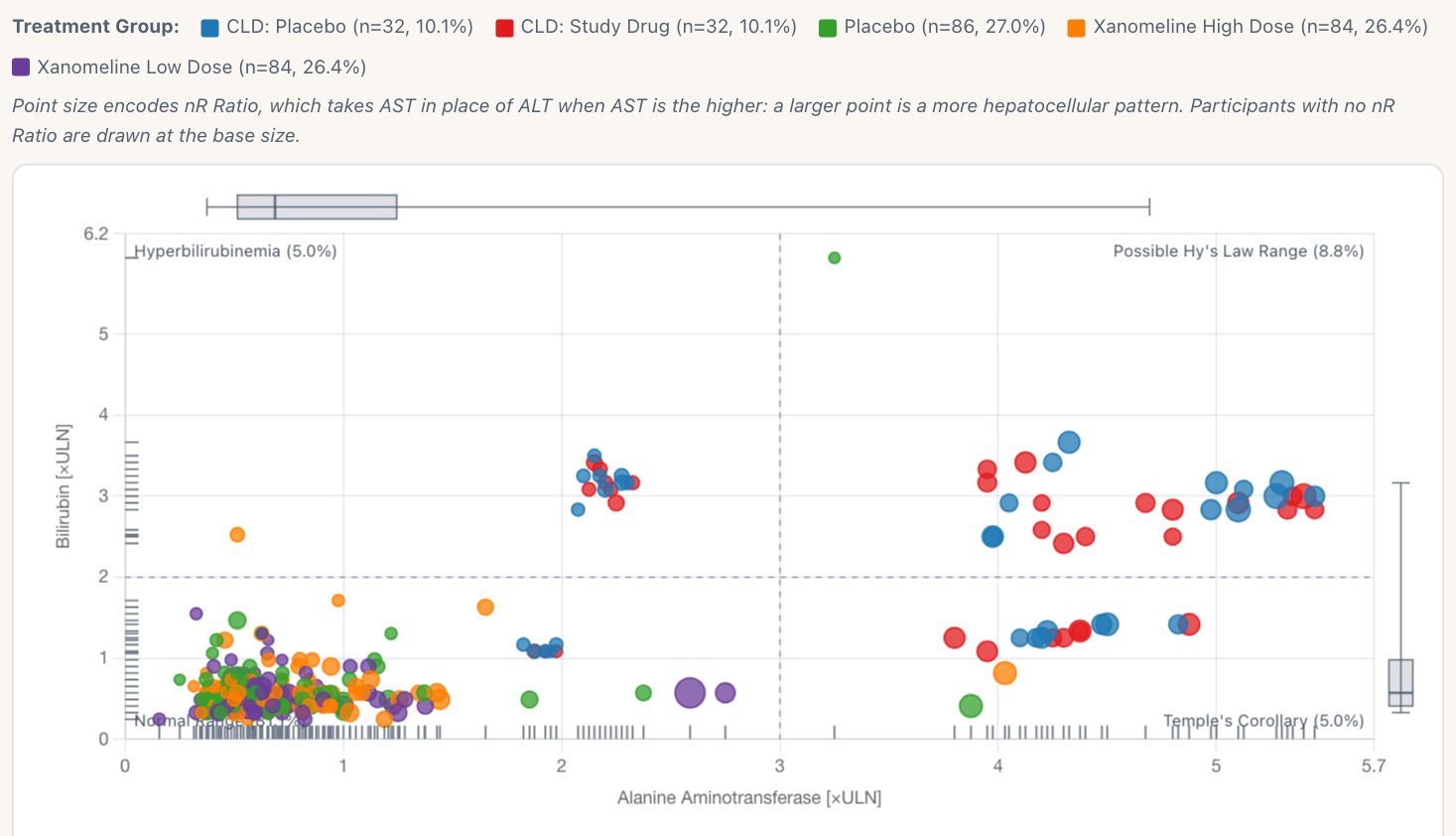
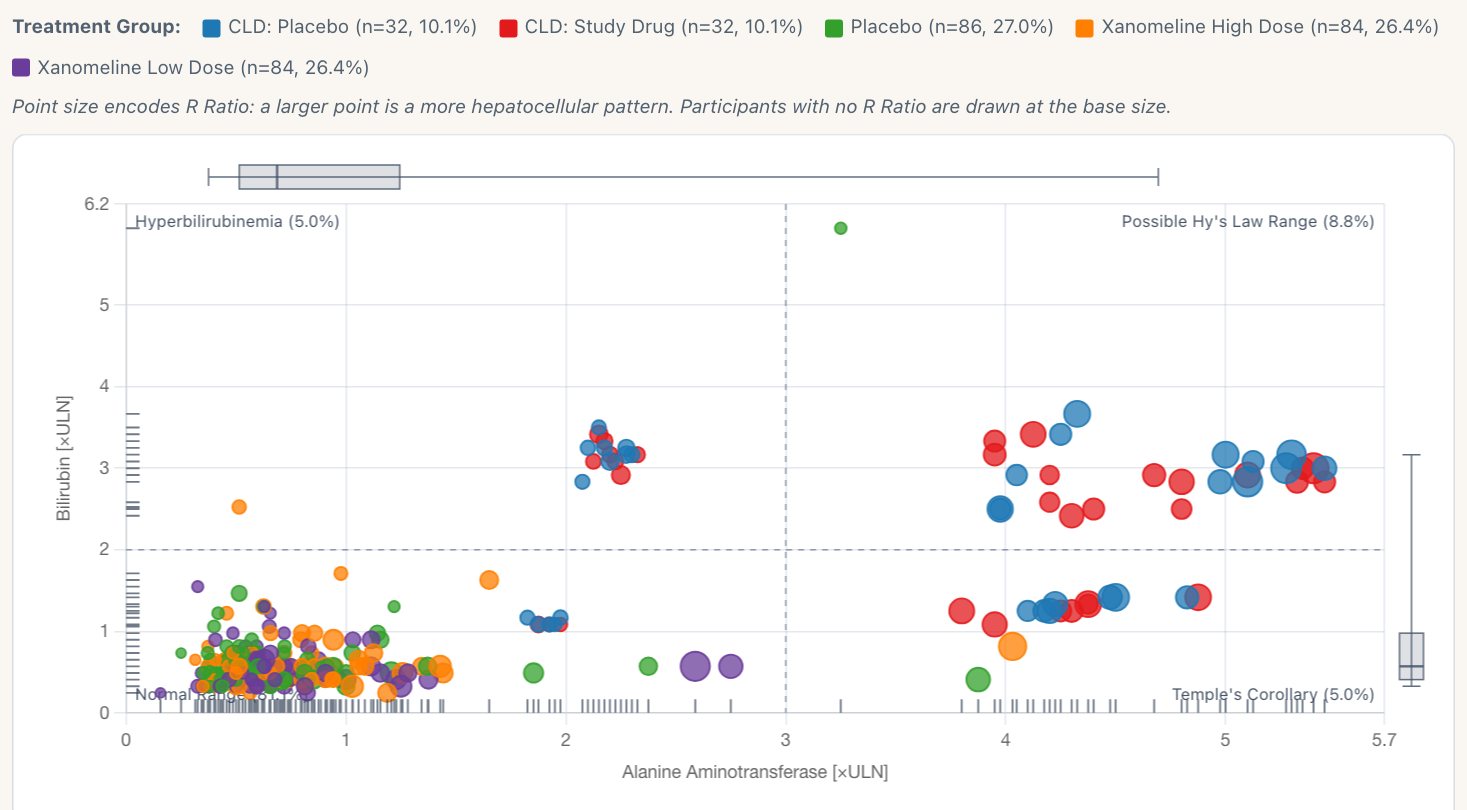
Switch between the two settings. Under nrRatio, participant 01-705-1292's point (marker 2) is the largest on the chart, because its AST is higher than its ALT. Under rRatio the largest point is a participant in the synthetic chronic liver disease groups.
nR under R in the tooltip
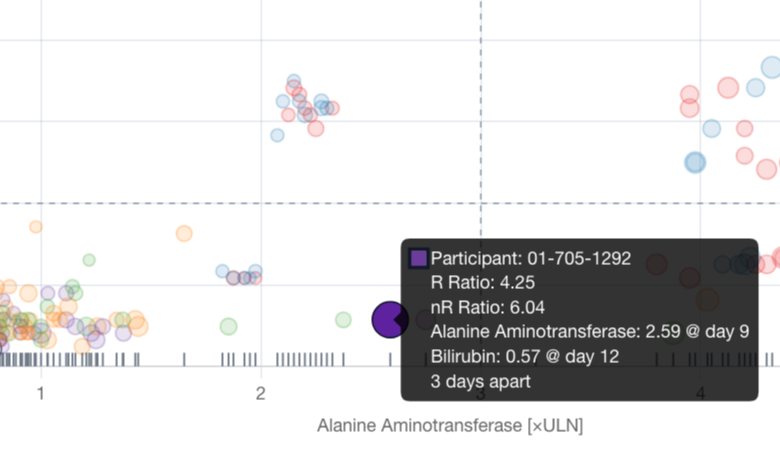
Every point's tooltip now has an nR line under R. Here is participant 01-705-1292: R is 4.25, in the mixed band, and nR is 6.04, in the hepatocellular band.
Participant: 01-705-1292R Ratio: 4.25Alanine Aminotransferase: 2.59 @ day 9Bilirubin: 0.57 @ day 123 days apart
Participant: 01-705-1292R Ratio: 4.25nR Ratio: 6.04Alanine Aminotransferase: 2.59 @ day 9Bilirubin: 0.57 @ day 123 days apart
- Open the Hep Explorer demo and choose eDISH / mDISH scatter under View.The scatter of peak ALT against peak bilirubin.
- Under Settings, set Point Size to nrRatio.The note above the chart explains nR. One point below the bilirubin cut-line, left of the ALT cut-line, becomes the largest: participant 01-705-1292.
- Hover that point.The tooltip shows R 4.25 and, under it, nR 6.04.
- Set Point Size to rRatio, then back.The largest point is now a participant in the synthetic chronic liver disease groups.
What did not change
- R, its range filter and its tooltip line are as they were. The filter still works on R only, because the original had no filter for nR.
- No other chart changes. The demo app's Hep Explorer gets the same setting and tooltip line, because it draws the same chart.
- The participant profile's header shows R only. Adding nR there would be a follow-up.
- The gsm.safety widget needs no change, because Point Size is chosen on the chart, not passed in as a setting.
Where to check it
- The Hep Explorer evidence page, which lists the new requirement row and its screenshot.
- The task: add nR to Point Size and the tooltip (#334), and its pull request (#335).
- The requirement matrix, with the new row for nR and three rows that now name it.
- The release notes, and the release preparation (#336).