QT Safety Explorer: test evidence Experimental
Requirement-traced qualification evidence for the safety.viz qt-explorer module.
Requirement matrix ↗ — the reviewed source specification these tests trace to.
- Scope
- 27 coverage rows55 distinct requirement IDs
- Tests executed
- 860 automated checks118 browser · 742 unit
- Result
- pass all passing8 evidence screenshots
- Generated
- 2026-10-04 12:03 UTC
- Environment
linux 6.17.0-1022-azure · node v22.23.3 · playwright 1.61.1 · chromium 149.0.7827.55- Test run
- Actions run #37200787716
Scope & approach
Traceability for the qt-explorer module (a Chart.js reimplementation of the SafetyGraphics/qtexplorer QT Safety Explorer, Phase 1, under #68; parent requirement obot.roadmap#36), per the convention in CONTRIBUTING.md. Requirement IDs use the module's condensed **QT-*** scheme cited in the source and test names — QT-CT-* (central tendency: per-arm change over time, Δ / ΔΔ, CI band, reference line, peak-effect visit, ICH-E14 metric), QT-OUT-* (outlier scatter: absolute-QTc diagonals, change lines, arm marks, tooltip), QT-CAT-* (categorical by-arm exceedance), QT-CTRL-* (view / correction / statistic / display / timepoint / filter controls), and QT-DATA-* (data contract, cleaning, baseline/change derivation). The Phase-1 scope is QTcF/QTcB corrections plus heart rate; QTcI, PR/QRS/JT, per-subject drill-down, QT-RR hysteresis, the guided ICH-E14 workflow, and a moxifloxacin positive-control arm are deferred to Phase 2 (the CDISC Pilot ADEG carries none of them). A reviewed source requirement matrix (qt-explorer.md in the requirements repo) is not yet published for the Phase-1 rows, so their source-matrix column is pending; each row lists the module IDs its test covers.
Two later additions (#136) close legacy review asks against the original renderer: QT-CT-008 prints the central-tendency values and CI bounds the band already draws, and QT-CAUTION-* mounts the standing not-for-clinical-use caution and the conditional unblinding warning once into the module shell, where no view can blank them.
Each table row traces one requirement to the automated test(s) that evidence it: the Requirement column shows the reviewed requirement text and its ID, the source-matrix rows link back to the specification, the issue column links the implementing work, and the result column shows the recorded outcome of every matching test from the committed evidence.json with its captured screenshots. Browser evidence is captured at fixed conditions (1280×800, device scale 1) on the canonical Linux CI environment.
Browser evidence (Playwright — tests/e2e/qt-explorer.spec.js)
13 requirement rows · 13 tests
| Requirement | Source matrix rows | Issue | Tests & evidence |
|---|---|---|---|
QT-CTRL-001, QT-CTRL-002, QT-CTRL-003 QT-CTRL-001 A View control switches between the three views — central tendency, outlier scatter, and categorical exceedance — rendering one styled, clickable row per view with the active view marked. QT-CTRL-002 A Correction control offers the configured parameter/correction options (default QTcF, QTcB, Heart Rate) and selects start_measure (QTcF) on first render, falling back to the first available measure when start_measure is unlisted. QT-CTRL-003 Statistic (mean / median), display (Δ / ΔΔ), timepoint, and categorical filter controls narrow the view; applyFilters constrains rows on the active selections only, so an empty selection constrains nothing. | — | #68 |
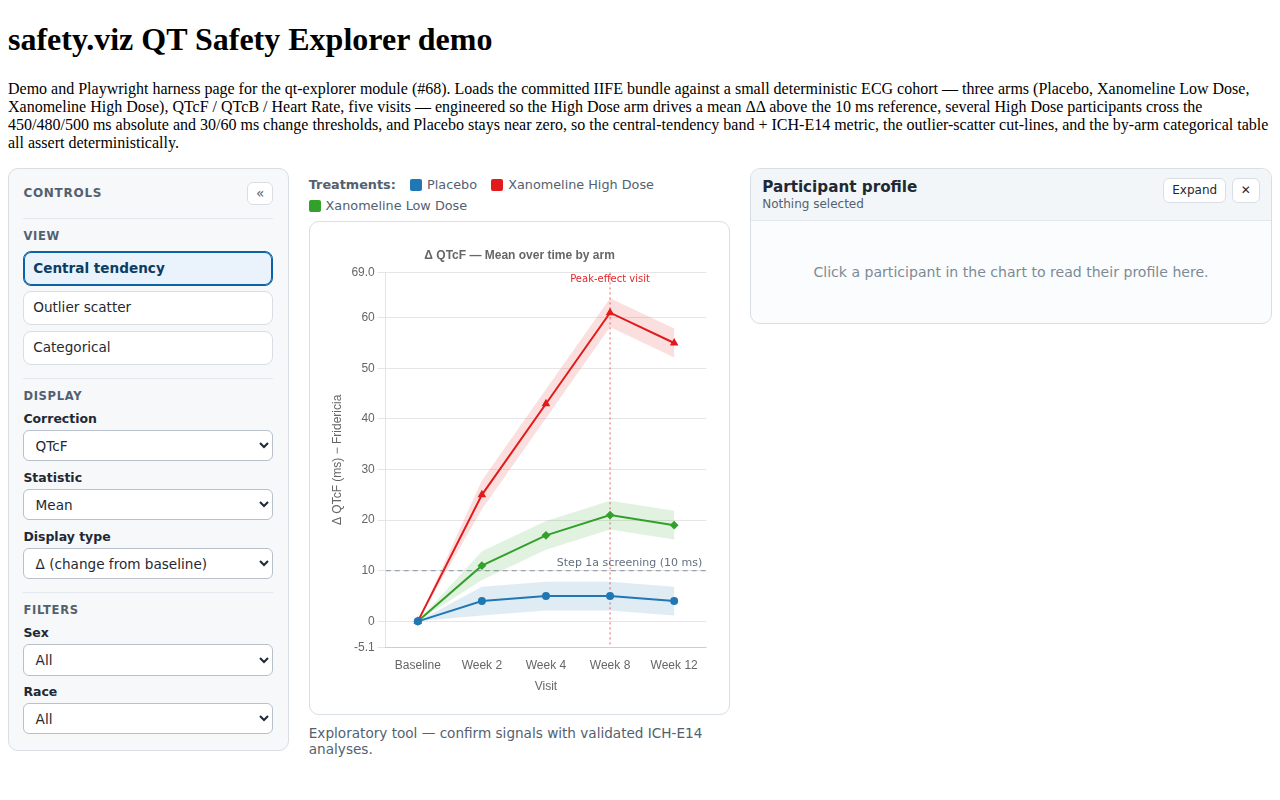 |
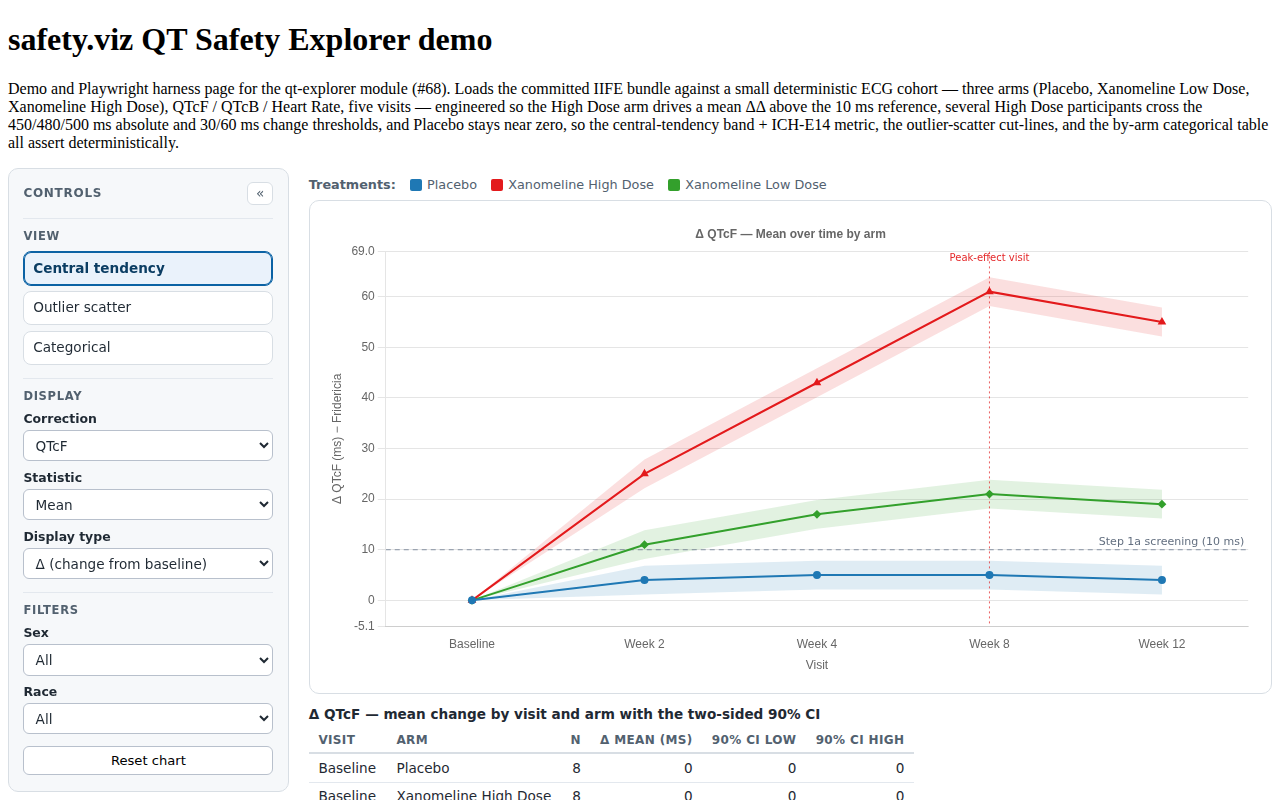
QT-CT-002, QT-CT-003, QT-CT-006 QT-CT-002 In mean mode the Δ series carries each arm's mean change with a two-sided 90% CI at every visit; in median mode the series carries no CI (lo/hi NaN). The chart draws per-arm lines with the CI band. Replicate readings (triplicate ECGs, for example) are averaged to one value per participant and visit before any mean, median or CI is computed, so each point's n is the number of participants. QT-CT-003 A mode-labelled horizontal reference line marks the ICH-E14 threshold of regulatory concern on the central-tendency chart. QT-CT-006 Each arm's peak-effect visit — the visit of maximum effect — is marked on the central-tendency chart. | — | #68 |
|
QT-CT-004, QT-CT-005 QT-CT-004 The placebo-corrected ΔΔ mode drops the placebo arm and subtracts the placebo mean change at each visit; the placebo arm is auto-detected (matching /placebo/i) and ordered first. QT-CT-005 The ICH-E14 metric is the largest upper bound of the two-sided 90% CI for the placebo-corrected mean difference (ΔΔ) across visits, flagged against the ~10 ms reference; the metric is reported only in mean + ΔΔ mode. | — | #68 |
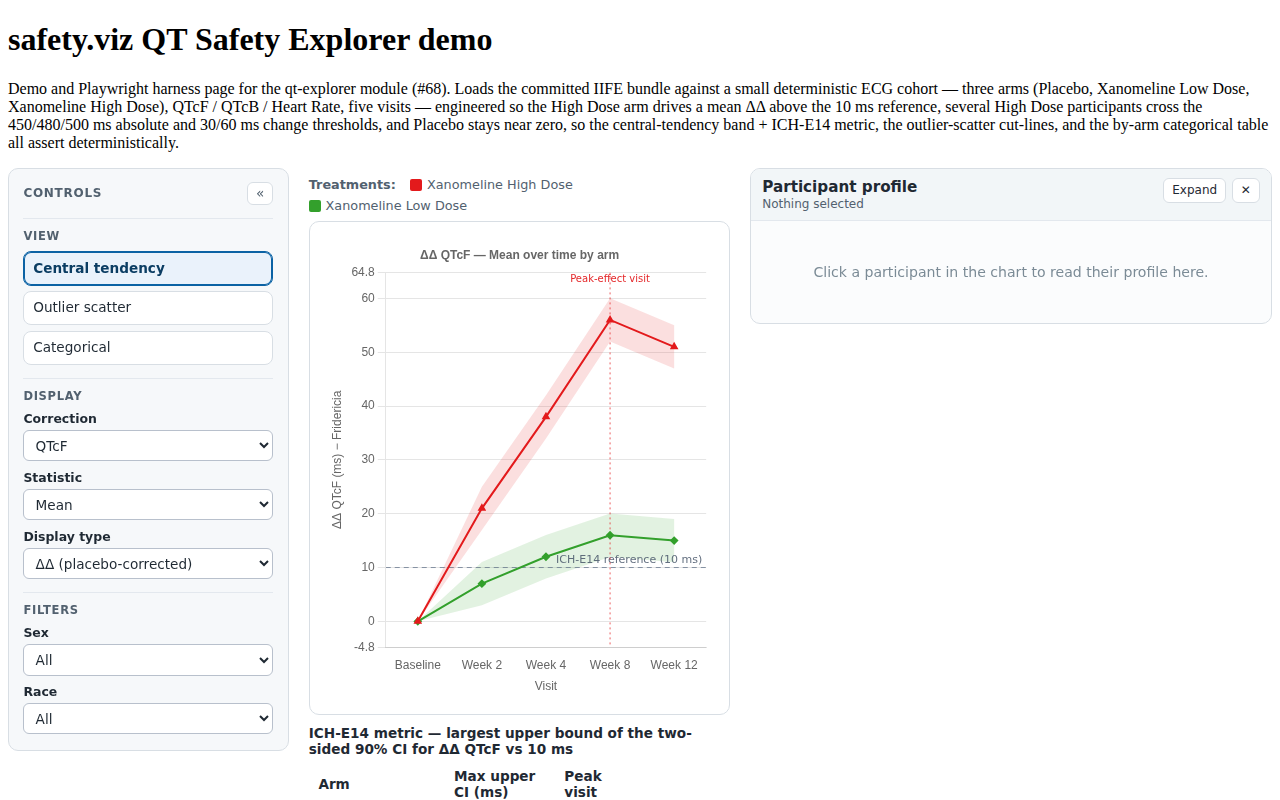 |
QT-CT-008 QT-CT-008 Beneath the central-tendency chart the view prints the plotted values as a table — one row per visit and arm carrying the number of participants (replicate readings are averaged to one value per participant and visit first, exactly as for the chart), the plotted Δ / ΔΔ mean or median change, and the lower and upper bounds of the two-sided 90% CI the band draws — built from the same series the chart consumes, so it honours the active correction, statistic, display mode, and filters; in median mode the CI columns read NA. | QT-CT-008 | #136 |
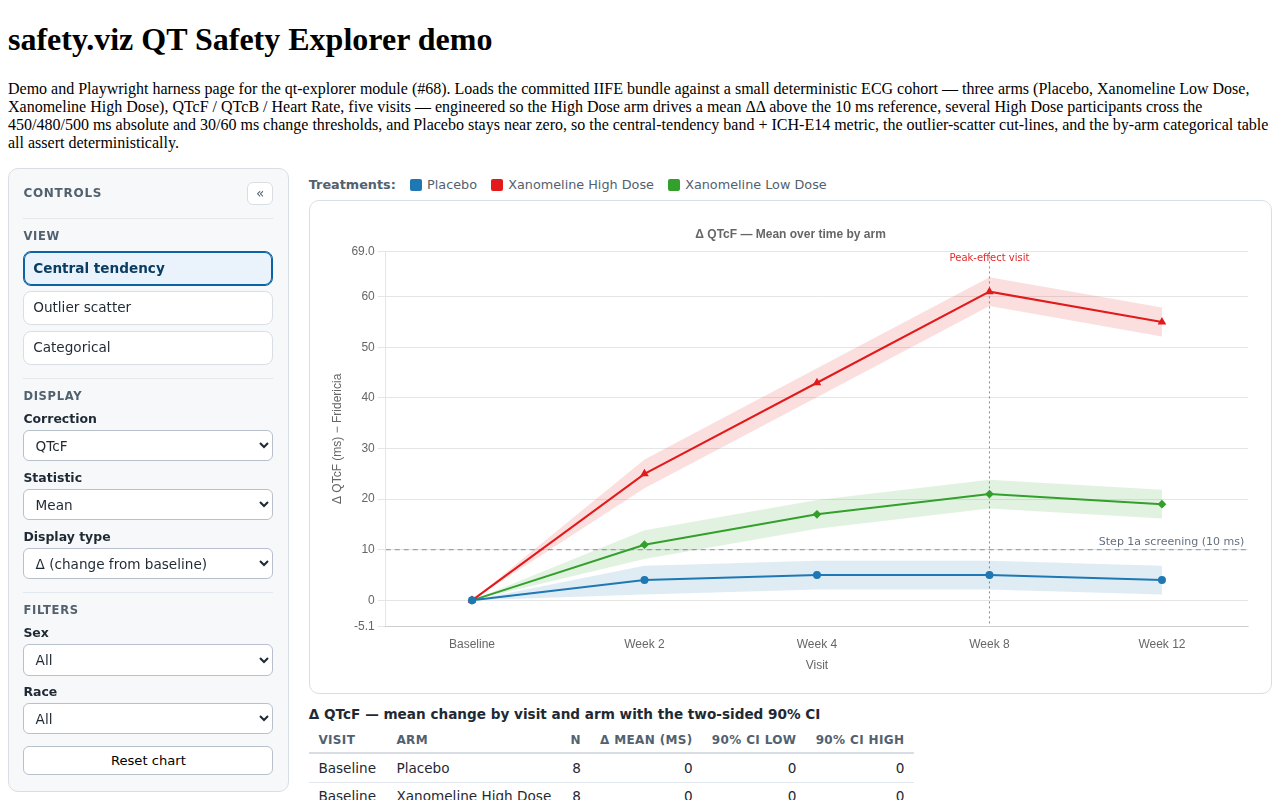 |
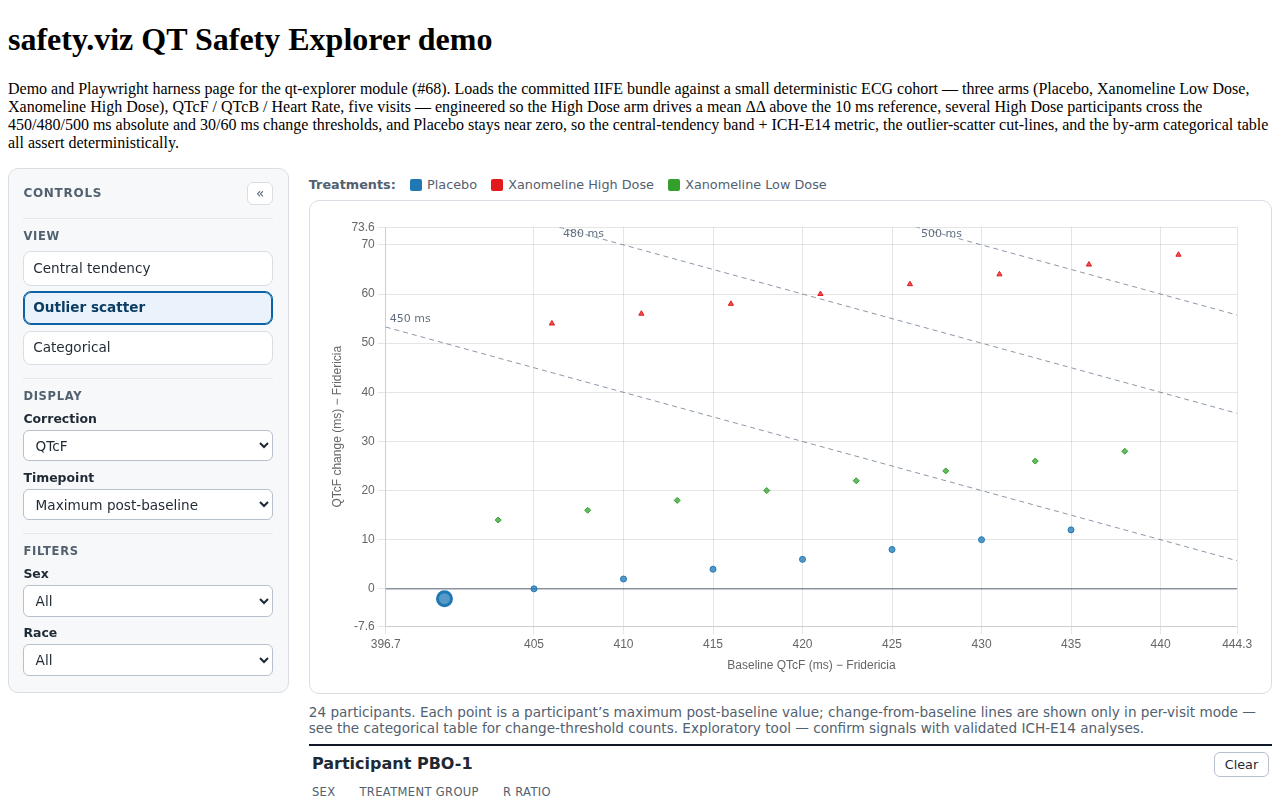
QT-OUT-002, QT-OUT-003, QT-OUT-004 QT-OUT-002 With a specific timepoint selected the scatter picks that visit's row per subject (matching a numeric-typed visit against a string timepoint); otherwise the maximum post-baseline value is used. QT-OUT-003 The outlier scatter draws the 450/480/500 ms absolute-QTc diagonals, and in per-visit mode adds the 30/60 ms change-from-baseline horizontal lines; the absolute cut-lines apply only to QTc corrections. QT-OUT-004 Each subject point is coloured and shaped by treatment arm, with a distinct cycling point style per arm. | — | #68 |
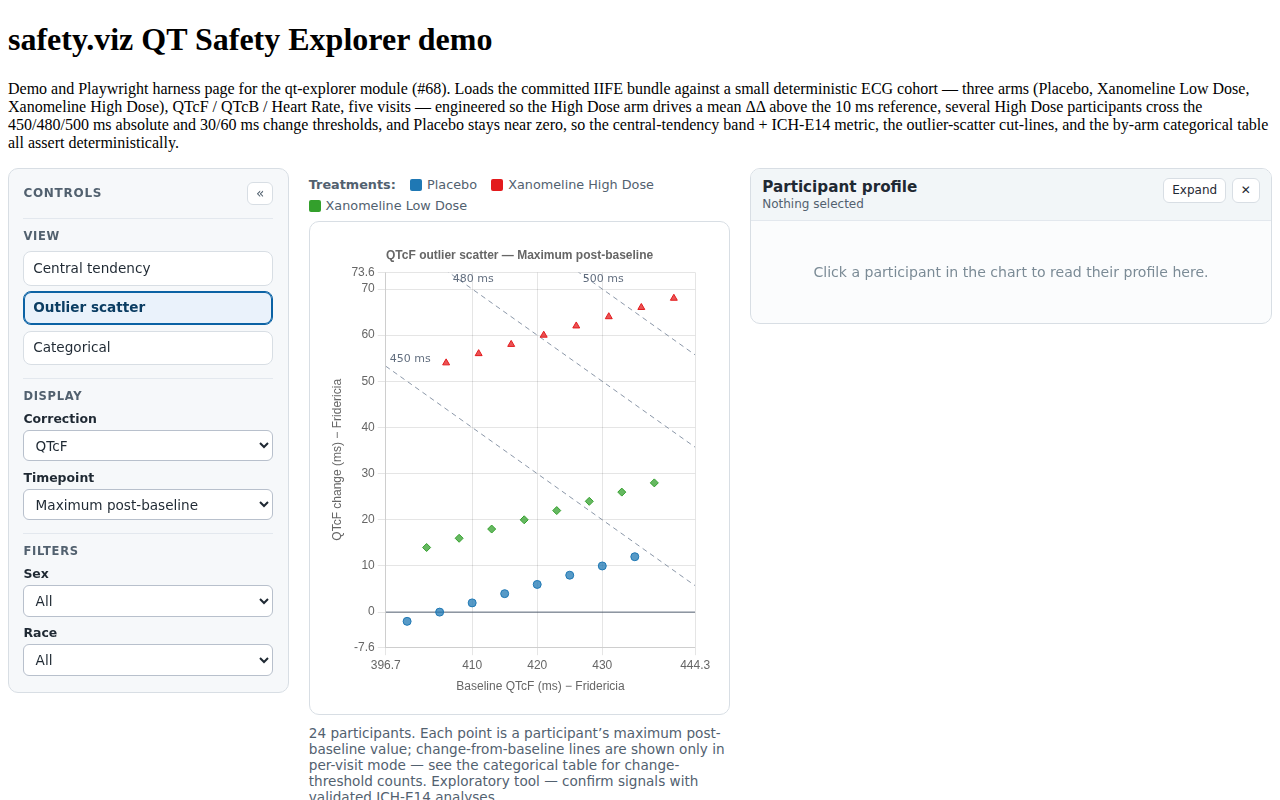 |
QT-OUT-003 QT-OUT-003 The outlier scatter draws the 450/480/500 ms absolute-QTc diagonals, and in per-visit mode adds the 30/60 ms change-from-baseline horizontal lines; the absolute cut-lines apply only to QTc corrections. | — | #68 |
|
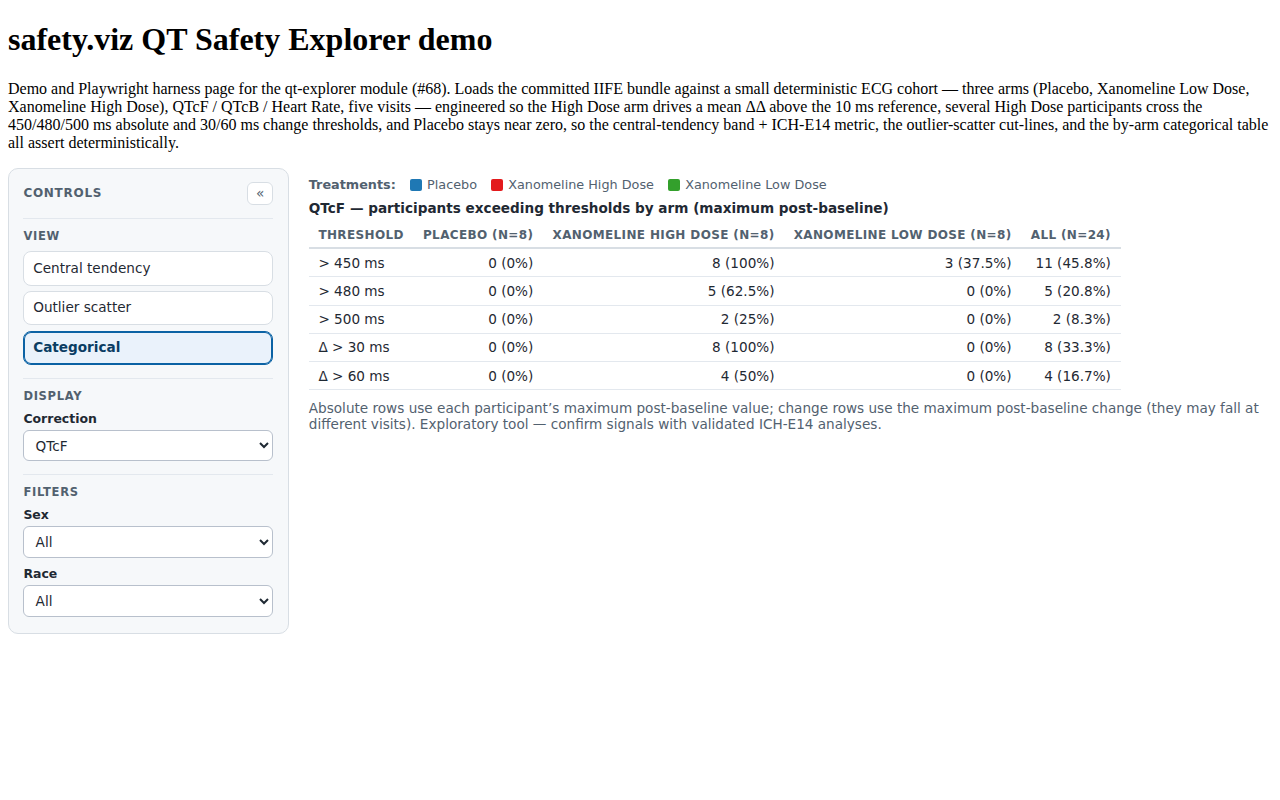
QT-CAT-001, QT-CAT-002, QT-CAT-003 QT-CAT-001 The categorical view hides the chart and tabulates by-arm exceedance, with denominators of post-baseline subjects per arm, tracking each subject's maximum value and maximum change independently. QT-CAT-002 Absolute-QTc thresholds (>450 / >480 / >500 ms) are counted per arm with a strict greater-than, so a value exactly at a threshold (e.g. 500) is excluded. QT-CAT-003 Change-from-baseline thresholds (>30 / >60 ms) are counted per arm using each subject's maximum change, independently of the maximum value. | — | #68 |
 |
QT-CT-007 QT-CT-007 Heart rate is offered as a central-tendency measure without the QTc ICH-E14 reference line (the ~10 ms threshold applies to QTc only). | — | #68 |
|
QT-OUT-007 QT-OUT-007 Heart rate shows a QTc-only note in the outlier scatter view, since the absolute and change diagonals apply to QTc corrections only. | — | #68 |
|
QT-CAUTION-001, QT-CAUTION-002 QT-CAUTION-001 The chart carries a standing caution — exploratory tool, not validated for clinical use, confirm any signal with the validated ICH-E14 analyses — rendered once into the module shell and shown in EVERY view, not written into the per-view footnote. QT-CAUTION-002 When the bound data carries more than one treatment arm the chart carries a standing unblinding warning — every view colours and labels participants by arm, so reading or sharing the results can unblind an ongoing study — rendered once into the module shell beside the clinical caution; a single-arm or already-pooled extract raises no warning. | QT-CAUTION-001, QT-CAUTION-002 | #136 |
 |
QT-DATA-003 QT-DATA-003 cleanData drops rows with a missing or non-numeric value and reports the removed count; the on-page removed-count path leaves no page errors. | — | #68 |
|
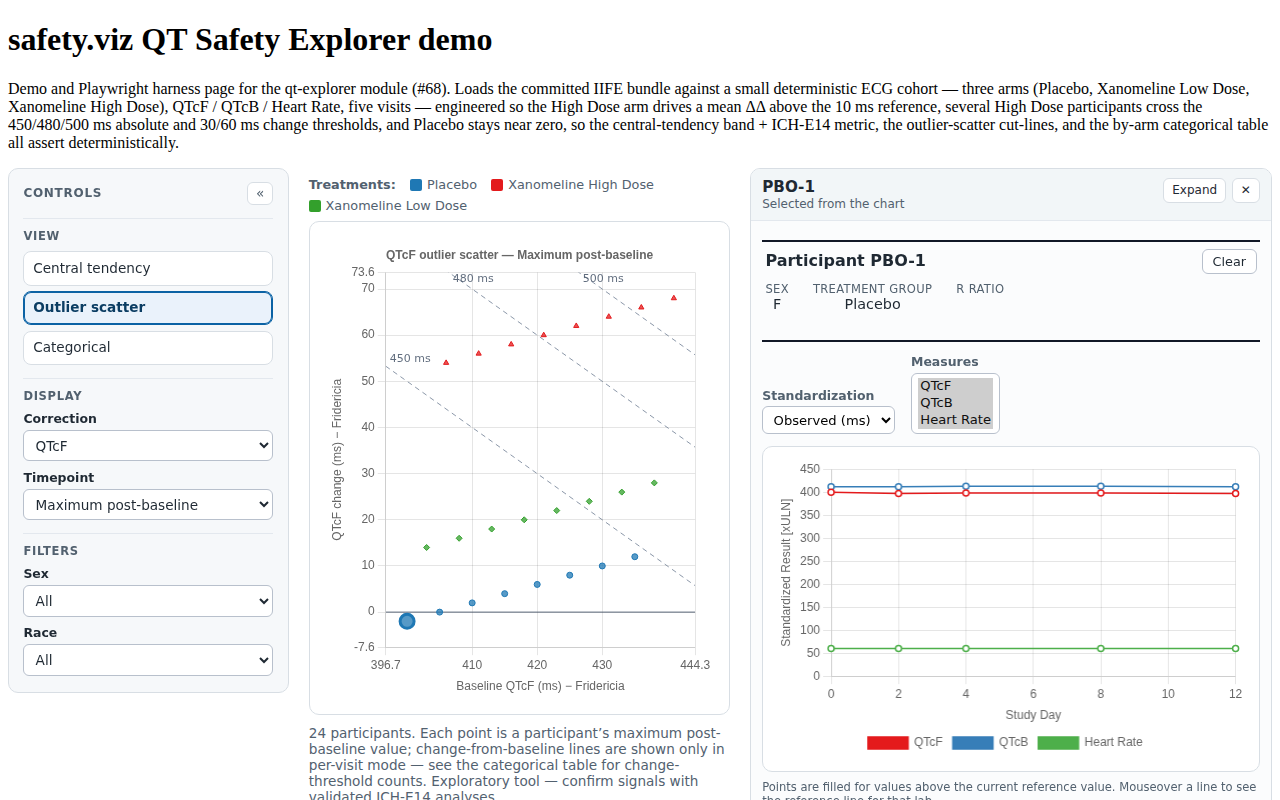
PPRF-QT-001, PPRF-QT-002 | PPRF-QT-001, PPRF-QT-002 (participant-profile matrix) | #99 |
  |
PPRF-QT-003, PPRF-QT-004 | PPRF-QT-003, PPRF-QT-004 (participant-profile matrix) | #99 |
|
Unit evidence (Vitest — tests/unit/qt-explorer/)
14 requirement rows · 111 tests
| Requirement | Source matrix rows | Issue | Tests & evidence |
|---|---|---|---|
QT-CFG-001..007 (settings normalization, z table, placebo resolution) QT-CFG-001 syncSettings fills defaults and normalizes field-list settings (arrayifying single values). QT-CFG-002 syncSettings sorts and numifies the threshold lists (absolute_thresholds, change_thresholds). QT-CFG-003 syncSettings falls back start_measure to the first available measure when the configured start_measure is not in the measure list. QT-CFG-004 syncSettings rejects an out-of-range ci_level, keeping the default (0.9). QT-CFG-005 The VIEWS list and the TIMEPOINT_MAX ("maximum post-baseline") sentinel are stable constants the controls and timepoint selection read from. QT-CFG-006 zForCi returns the two-sided z multiplier for a confidence level, interpolating between table points and clamping at the ends. QT-CFG-007 resolvePlaceboArm prefers the explicit placebo setting when present and otherwise auto-detects the placebo arm by matching /placebo/i. | — | #68 |
|
QT-DATA-005 (schema required columns) QT-DATA-005 checkInputs validates the schema's required column settings (measure_col, value_col, arm_col, baseline_col) against the remapped names and throws naming every missing column; the baseline record is identified by the baseline flag (ABLFL=Y) and excluded from the post-baseline extremes, and when no baseline-flag column is present a change-of-0 row is treated as the baseline. | — | #68 |
|
QT-DATA-003/004/006, QT-STAT-001/002 (cleaning, change derivation, stats) QT-DATA-003 cleanData drops rows with a missing or non-numeric value and reports the removed count; the on-page removed-count path leaves no page errors. QT-DATA-004 Change from baseline is the source change column when present, and is otherwise derived as value − baseline when that column is blank. QT-DATA-006 measuresPresent lists the distinct measures actually present in the data, so the correction control offers only measures the dataset carries. QT-STAT-001 The unique helper keeps first-seen non-empty values, preserving order for the arm/visit/measure lists. QT-STAT-002 The statistics helpers (mean, sd, quantile, median) match hand-computed values, backing the central-tendency means, the CI, and the categorical summaries. | — | #68 |
|
QT-CT-001/002/004/005/006 (central-tendency series, ΔΔ, ICH-E14, peaks) QT-CT-001 The central-tendency view plots per-arm change-from-baseline over ordered study visits (visits sorted by numeric visit), one series per treatment arm. QT-CT-002 In mean mode the Δ series carries each arm's mean change with a two-sided 90% CI at every visit; in median mode the series carries no CI (lo/hi NaN). The chart draws per-arm lines with the CI band. Replicate readings (triplicate ECGs, for example) are averaged to one value per participant and visit before any mean, median or CI is computed, so each point's n is the number of participants. QT-CT-004 The placebo-corrected ΔΔ mode drops the placebo arm and subtracts the placebo mean change at each visit; the placebo arm is auto-detected (matching /placebo/i) and ordered first. QT-CT-005 The ICH-E14 metric is the largest upper bound of the two-sided 90% CI for the placebo-corrected mean difference (ΔΔ) across visits, flagged against the ~10 ms reference; the metric is reported only in mean + ΔΔ mode. QT-CT-006 Each arm's peak-effect visit — the visit of maximum effect — is marked on the central-tendency chart. | — | #68 |
|
QT-CT-008 (printed central-tendency values table) QT-CT-008 Beneath the central-tendency chart the view prints the plotted values as a table — one row per visit and arm carrying the number of participants (replicate readings are averaged to one value per participant and visit first, exactly as for the chart), the plotted Δ / ΔΔ mean or median change, and the lower and upper bounds of the two-sided 90% CI the band draws — built from the same series the chart consumes, so it honours the active correction, statistic, display mode, and filters; in median mode the CI columns read NA. | QT-CT-008 | #136 |
|
QT-OUT-001/002 (subject points, max post-baseline vs visit) QT-OUT-001 The outlier scatter plots one point per subject at the subject's maximum post-baseline QTc value against their baseline QTc. QT-OUT-002 With a specific timepoint selected the scatter picks that visit's row per subject (matching a numeric-typed visit against a string timepoint); otherwise the maximum post-baseline value is used. | — | #68 |
|
QT-CAT-001/002/003 (by-arm exceedance counts and percents) QT-CAT-001 The categorical view hides the chart and tabulates by-arm exceedance, with denominators of post-baseline subjects per arm, tracking each subject's maximum value and maximum change independently. QT-CAT-002 Absolute-QTc thresholds (>450 / >480 / >500 ms) are counted per arm with a strict greater-than, so a value exactly at a threshold (e.g. 500) is excluded. QT-CAT-003 Change-from-baseline thresholds (>30 / >60 ms) are counted per arm using each subject's maximum change, independently of the maximum value. | — | #68 |
|
QT-SCL-001..008 (correction suffix, axis titles, domains, arm marks) QT-SCL-001 correctionSuffix maps the QTc formulas to their axis-title suffix (QTcF → Fridericia, QTcB → Bazett). QT-SCL-002 isQtcMeasure and measureUnit distinguish a QTc correction (msec, cut-lines apply) from heart rate (bpm, no QTc cut-lines). QT-SCL-003 The central-tendency axis title carries the mode prefix (Δ / ΔΔ) plus the correction suffix and units. QT-SCL-004 The outlier-scatter axis titles mirror the design mockup (baseline QTc on x, change-from-baseline on y, with the correction suffix). QT-SCL-005 formatNumber trims trailing zeros and guards non-finite values in tick and tooltip formatting. QT-SCL-006 formatSigned signs the change value with a real minus glyph (−) for the tooltip and change labels. QT-SCL-007 paddedDomain covers the data values plus any forced inclusions (the threshold cut-lines), and handles an empty or degenerate sample without collapsing. QT-SCL-008 The scatter assigns a distinct cycling point style per arm so arms are distinguishable by shape as well as colour. | — | #68 |
|
QT-PLG-001/002/003 (color scale, rgba, scatter tooltip) QT-PLG-001 hexToRgba converts a hex colour to an rgba string at a given opacity, backing the CI band and point fills. QT-PLG-002 armColorScale assigns stable, cycling colours per arm, consistent across the central-tendency, scatter, and categorical views. QT-PLG-003 scatterTooltip renders the outlier-point tooltip lines — id, arm, baseline, value, change, and visit. | — | #68 |
|
QT-API-001 (module export) QT-API-001 The public safety.viz collection exposes a | — | #68 |
|
QT-CAUTION-001, QT-CAUTION-002 (standing caution, unblinding gate) QT-CAUTION-001 The chart carries a standing caution — exploratory tool, not validated for clinical use, confirm any signal with the validated ICH-E14 analyses — rendered once into the module shell and shown in EVERY view, not written into the per-view footnote. QT-CAUTION-002 When the bound data carries more than one treatment arm the chart carries a standing unblinding warning — every view colours and labels participants by arm, so reading or sharing the results can unblind an ongoing study — rendered once into the module shell beside the clinical caution; a single-arm or already-pooled extract raises no warning. | QT-CAUTION-001, QT-CAUTION-002 | #136 |
|
PPRF-QT-001..004 (rail adoption, interval-measure mapping, clear paths) | PPRF-QT-001..004 (participant-profile matrix) | #99 |
|
QT-FILT-001..004 (shared filter contract) QT-FILT-001 A filter spec accepts QT-FILT-002 QT-FILT-003 QT-FILT-004 | QT-FILT-001, QT-FILT-002, QT-FILT-003, QT-FILT-004 | #166 |
|
QT-CTRL-004 (whole-chart reset, back to the central view) QT-CTRL-004 A reset control at the foot of the control panel restores every settings-derived control to its configured default, re-pins the correction to one the bound data carries, clears the scatter selection and the docked profile, and re-renders. Reset is a WHOLE-chart reset: it also returns the reader to the central-tendency view, rather than resetting the controls within whichever view is open. | QT-CTRL-004 | #136 |
|
Railed participant profile (#99, PPRF-QT)
0 requirement rows · 0 tests
| Requirement | Source matrix rows | Issue | Tests & evidence |
|---|
Visual evidence
Every screenshot below is a committed baseline: the same PNG is the visual-regression baseline the browser suite asserts against and the evidence artifact shown here. Click any capture for the full-resolution image.
PPRF QT 002 docked profile observed ms PPRF QT 002 railed profile observed ms QT CAT 002 categorical table QT CAUTION 001 standing caution QT CT 005 delta delta ich metric QT CT 008 central tendency table QT CTRL 001 central tendency delta QT OUT 003 outlier scatter max
Source-matrix routing status
No reviewed source requirement matrix exists yet for this module (the config's qt-explorer.md matrix link resolves once it is published in the requirements repo), so routing is against the Phase-1 port spec's scope rather than matrix rows.
- Implemented (
browser/unitabove): the per-arm central-tendency change over time with a mean/median statistic and a Δ / placebo-corrected ΔΔ toggle (QT-CT-001/002/004), a two-sided 90% CI band, the mode-labelled reference line and the peak-effect-visit marker (QT-CT-003/006), the ICH-E14 metric — the largest upper bound of the two-sided 90% CI for the mean difference vs the ~10 ms reference (QT-CT-005); the outlier scatter of change-from-baseline vs baseline QTc with the 450/480/500 ms absolute diagonals, the 30/60 ms change lines (per-visit mode), the zero no-change line, per-arm colour + mark shape, and the point tooltip (QT-OUT-001..006); the by-arm categorical exceedance table for the absolute and change thresholds with per-arm denominators (QT-CAT-001..003); the view / correction / statistic / display / timepoint / filter controls (QT-CTRL-001..003); and the data contract, cleaning, and source-or-derived change (QT-DATA-001..006). Heart rate is offered in central tendency without the QTc reference line and shows a QTc-only note in the scatter and categorical views (QT-CT-007, QT-OUT-007).
- Deferred (Phase 2, not part of the Phase-1 claim): the QTcI individualized correction (per-subject QT-RR slopes), PR/QRS/JT multi-interval categorical rows, the per-subject drill-down (electrolytes/TSH spaghetti plots), the QT-RR hysteresis plot, the guided step-by-step ICH-E14 evaluation workflow, and a moxifloxacin positive-control arm — none present in the CDISC Pilot ADEG. The ΔΔ CI is a large-sample normal approximation for exploratory screening, not the regulatory ANCOVA/MMRM least-squares-means bound.
View-selector rollout (VIEW-2, #76)
The View selector (QT-CTRL-001) is now the shared shell builder renderViewSelector — the module-scoped qt-view-* CSS + builder were removed with no visual or behavioral change (option class names moved to the neutral sv-view-* namespace). See view-selector-inventory.md.
Reproducing this report
The evidence set is regenerated from a full test run and committed with the code it qualifies; CI fails when they drift. To verify or rebuild it:
npm ci
npm run evidence:check   # compare a fresh run against the committed evidence
npm run evidence         # regenerate docs/evidence/qt-explorer/evidence.json
Screenshot baselines are canonical to the Linux CI runner; the repository's Update evidence baselines workflow is the authoritative way to refresh them. See CONTRIBUTING.md for the traceability convention.