Nephrotoxicity Explorer: test evidence Experimental
Requirement-traced qualification evidence for the safety.viz nep-explorer module.
Requirement matrix ↗ — the reviewed source specification these tests trace to.
- Scope
- 25 coverage rows51 distinct requirement IDs
- Tests executed
- 834 automated checks115 browser · 719 unit
- Result
- pass all passing7 evidence screenshots
- Generated
- 2026-10-04 12:03 UTC
- Environment
linux 6.17.0-1022-azure · node v22.23.3 · playwright 1.61.1 · chromium 149.0.7827.55- Test run
- Actions run #37200787716
Scope & approach
Traceability for the nep-explorer module (a Chart.js reimplementation of the SafetyGraphics/nepExplorer KDIGO nephrotoxicity explorer, Phase 1, under #120; parent requirement obot.roadmap#35, design 35_design.html), per the convention in CONTRIBUTING.md. The reviewed source matrix is requirements/nep-explorer.md in this repo, and each row below cites the matrix rows its test covers.
Requirement IDs use the module's condensed NEP-* scheme cited in the source and test names — NEP-CFG-* (settings, the stages and units objects, measure resolution), NEP-UNIT-* (per-record mg/dL conversion, string normalization, the refuse-to-guess path), NEP-DATA-* (baseline resolution and its fallback, per-participant maxima, dropped records and their export), NEP-STAGE-* (the fold ladder, the 0.3 mg/dL trigger, the ≥ 4.0 mg/dL rule, the combined stage), NEP-ZONE-* (zone geometry, paint order, labels, axis floors), NEP-SCAT-* (marks, tooltip, selection and the dispatched event), NEP-TBL-* (the summary table), NEP-API-* (the module export), and NEP-COHORT-* (the synthetic AKI demo cohort's own data-shape assertions, per #89 DEMO-6).
Three rows exist because the port deliberately diverges from the R source, each with design §3 as its citation: the staging ladder is read worst-first off parameterized cut-points (D4, the source's case_when ascends so its Stage 2 and 3 arms are unreachable while its chart paints the same numbers descending); the absolute-change domain extends below zero (D6, the source's y-limits drop a fifth of the RhoInc cohort unannounced); and the ≥ 4.0 mg/dL Stage-3 rule is a mark property rather than a region of the plane (D5). The Phase-1 scope is the creatinine scatter and stage summary; the patient-profile drill-down, its RhoInc dataset and the derived CKD-EPI eGFR are Phase 2, and scatter time-animation is out entirely (D3).
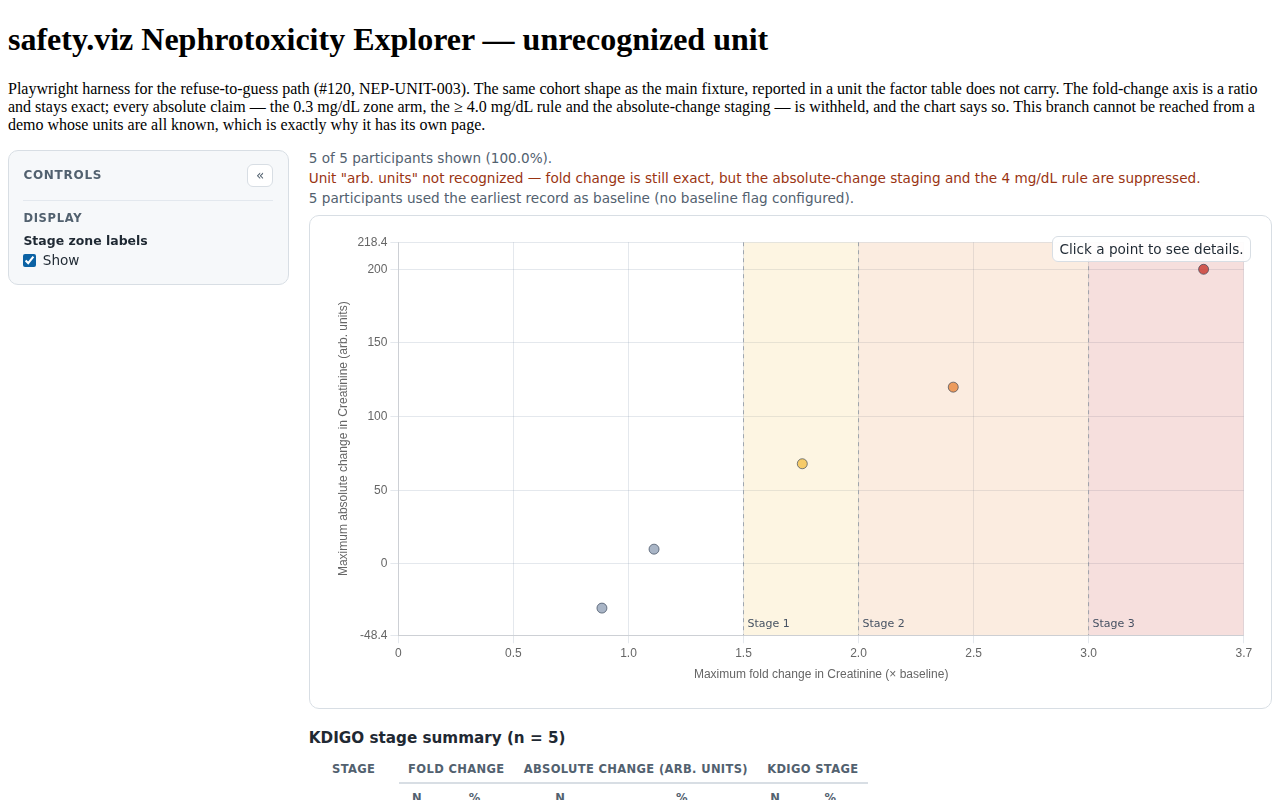
One branch cannot be reached from the demo, whose units are all known: the unknown-unit suppression path. It carries its own browser fixture page (tests/e2e/fixtures/nep-explorer-unknown-units.html) as well as unit tests, so it is evidenced rather than assumed.
Each table row traces one requirement to the automated test(s) that evidence it: the Requirement column shows the reviewed requirement text and its ID, the source-matrix rows link back to the specification, the issue column links the implementing work, and the result column shows the recorded outcome of every matching test from the committed evidence.json with its captured screenshots. Browser evidence is captured at fixed conditions (1280×800, device scale 1) on the canonical Linux CI environment.
Browser evidence (Playwright — tests/e2e/nep-explorer.spec.js)
10 requirement rows · 10 tests
| Requirement | Source matrix rows | Issue | Tests & evidence |
|---|---|---|---|
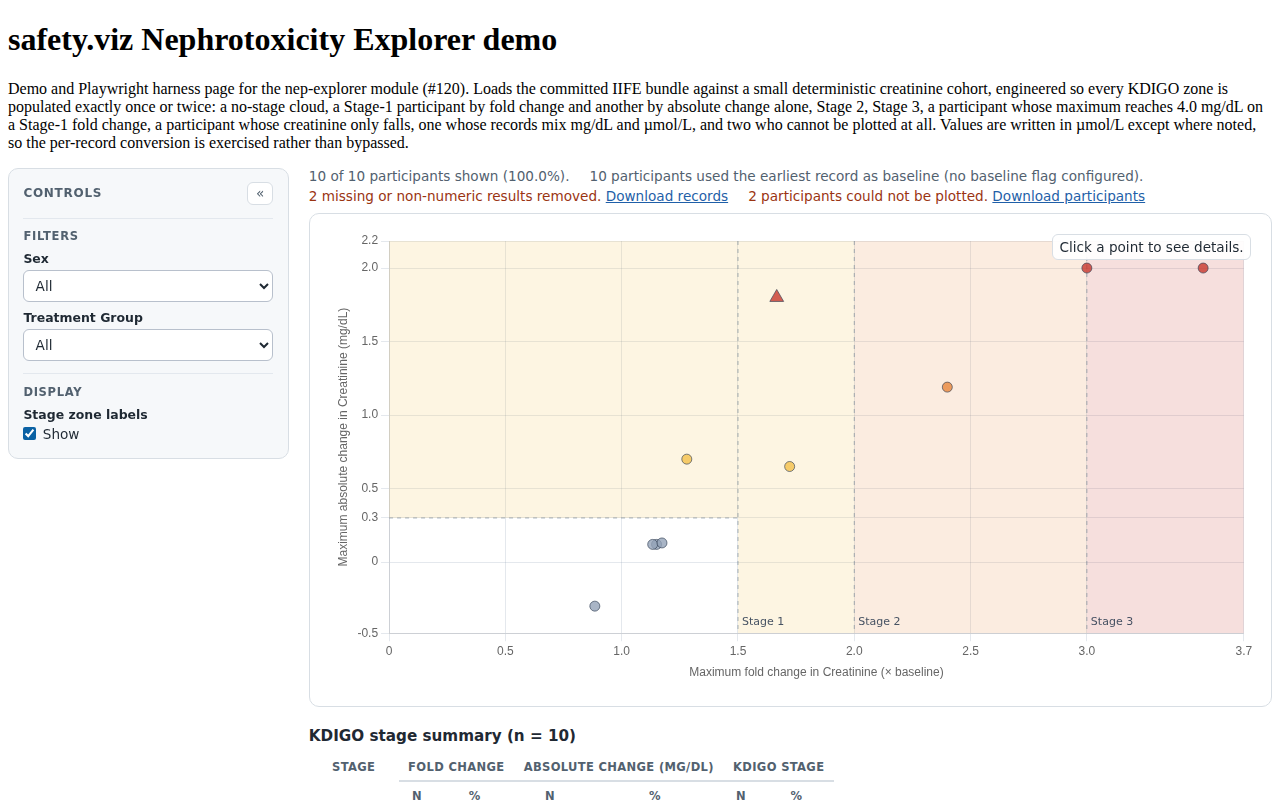
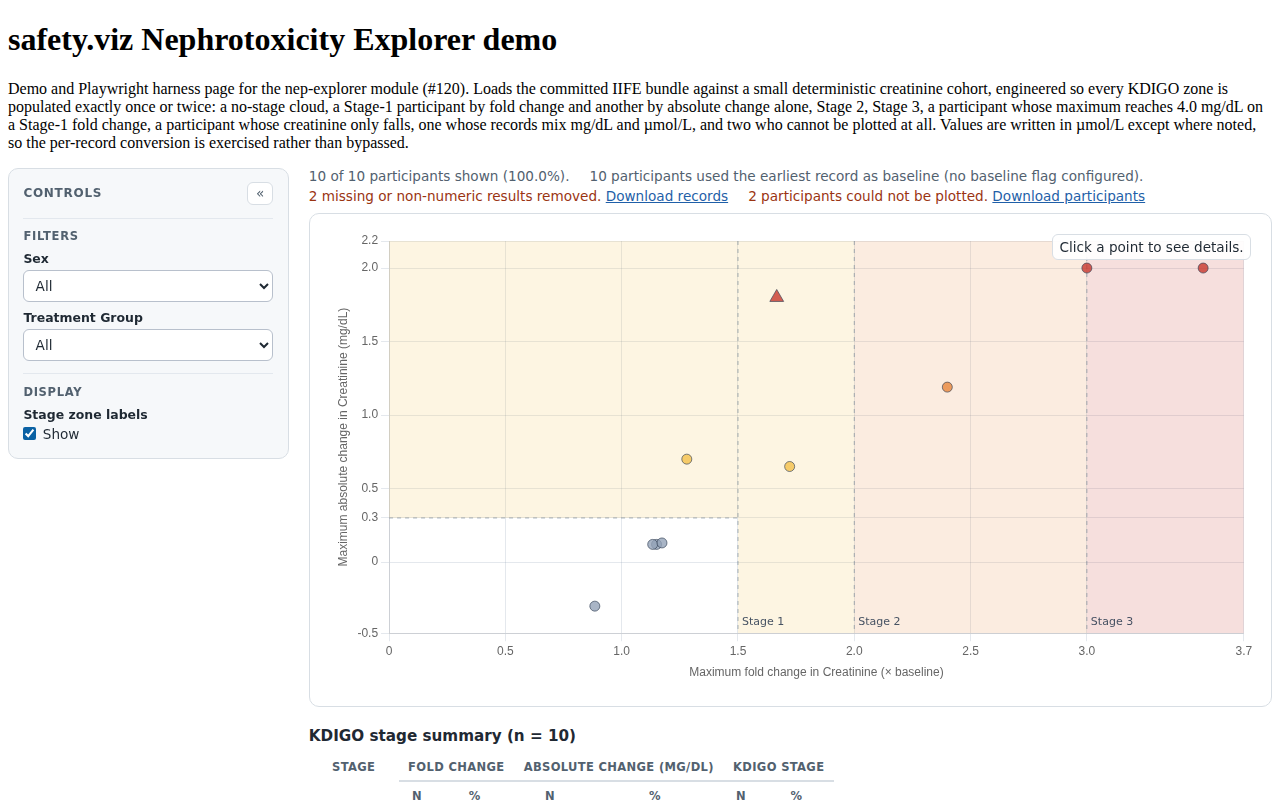
NEP-ZONE-001, NEP-ZONE-002 NEP-ZONE-001 The stage zones are painted as filled regions from the staging cut-points: a Stage-3 band above the last fold cut, a Stage-2 band between the second and third, and Stage 1 as the band between the first and second PLUS everything at or above the absolute trigger below the first — the L. The no-stage box is left unpainted. Regions are clipped to the visible domain and omitted when it excludes them. NEP-ZONE-002 Zones are drawn in | NEP-ZONE-001, NEP-ZONE-002 | #120 |
 |
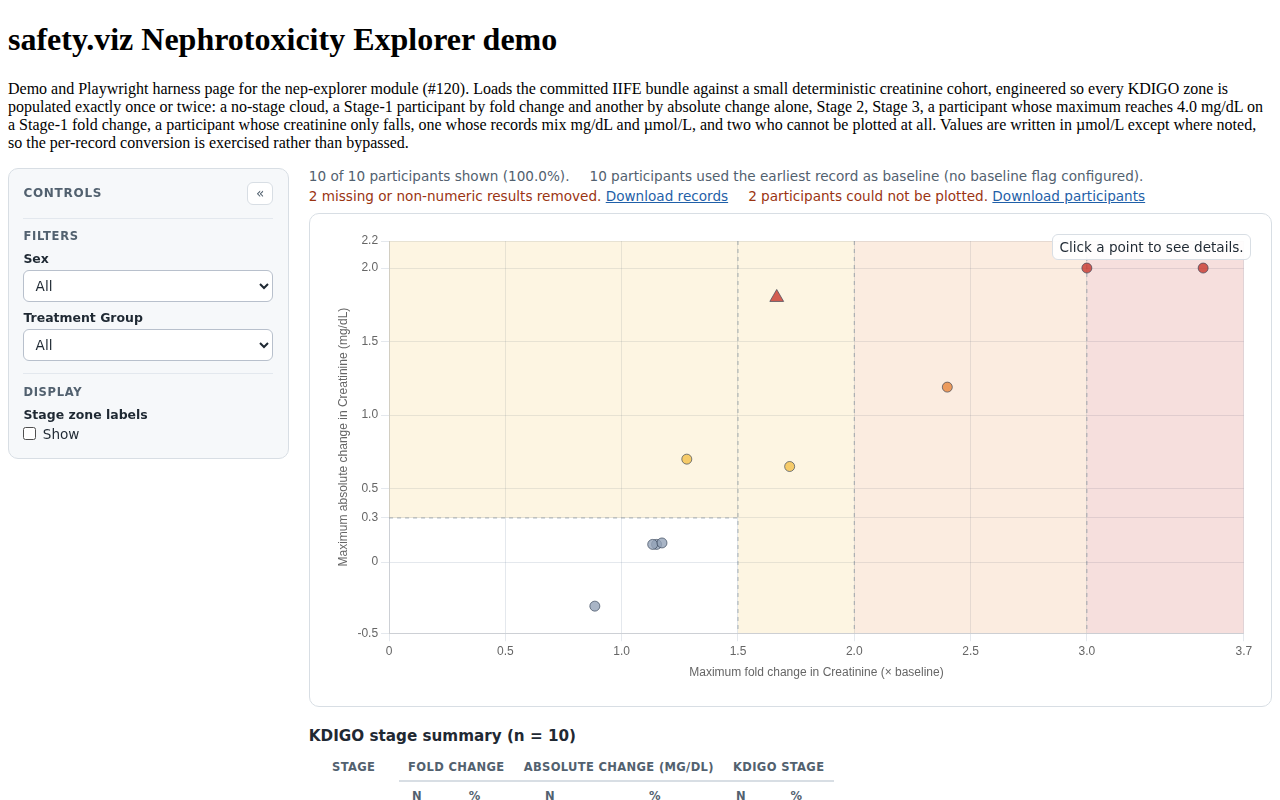
NEP-ZONE-004 NEP-ZONE-004 A control hides the zone labels without removing the zones, for a reviewer reading the cloud rather than the regions. | NEP-ZONE-004 | #120 |
 |
NEP-STAGE-001, NEP-STAGE-004 NEP-STAGE-001 The fold-change ladder stages a participant at 1.5× (Stage 1), 2× (Stage 2) and 3× (Stage 3), read WORST-MATCH-FIRST so no cut-point can be shadowed by a lower one. NEP-STAGE-004 The combined stage the zones show is the WORSE of the two axes, raised to Stage 3 by the absolute-value rule; a suppressed absolute-change stage cannot lower the fold stage. | NEP-STAGE-001, NEP-STAGE-004 | #120 |
|
NEP-UNIT-002 NEP-UNIT-002 Results convert to the target unit PER RECORD (1 mg/dL = 88.4 µmol/L) before any comparison, so one participant's records may mix known units and still stage correctly. | NEP-UNIT-002 | #120 |
|
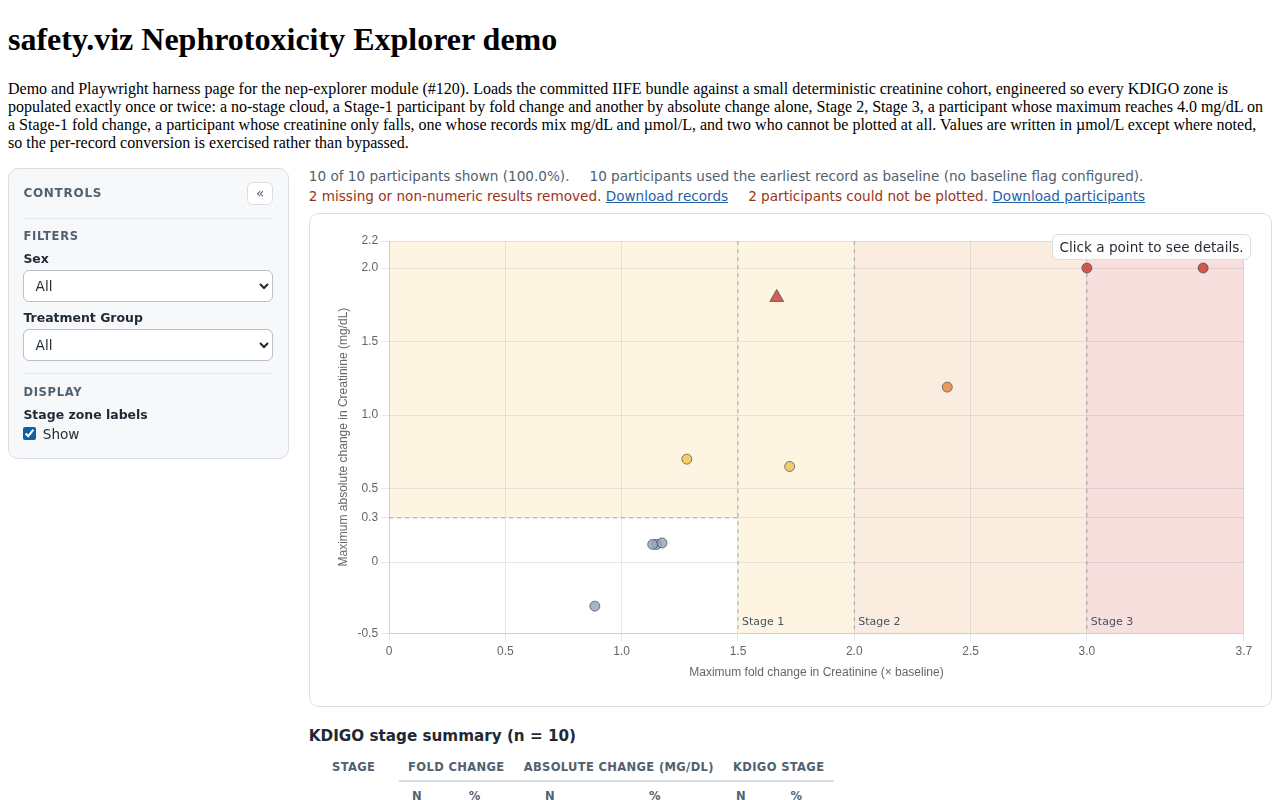
NEP-SCAT-001, NEP-STAGE-003 NEP-SCAT-001 One mark per participant, filled by the combined stage so the cloud reads by severity even with the zones hidden, with a distinct larger marker for a participant tripping the absolute-value rule. NEP-STAGE-003 A participant whose maximum creatinine reaches ≥ 4.0 mg/dL is Stage 3 whatever their fold change says. The rule is a property of the participant — the value reached, not a change — so it is carried on the mark and in the tooltip rather than as a region of the plane, and is counted as Stage 3 in the summary table. | NEP-SCAT-001, NEP-STAGE-003 | #120 |
 |
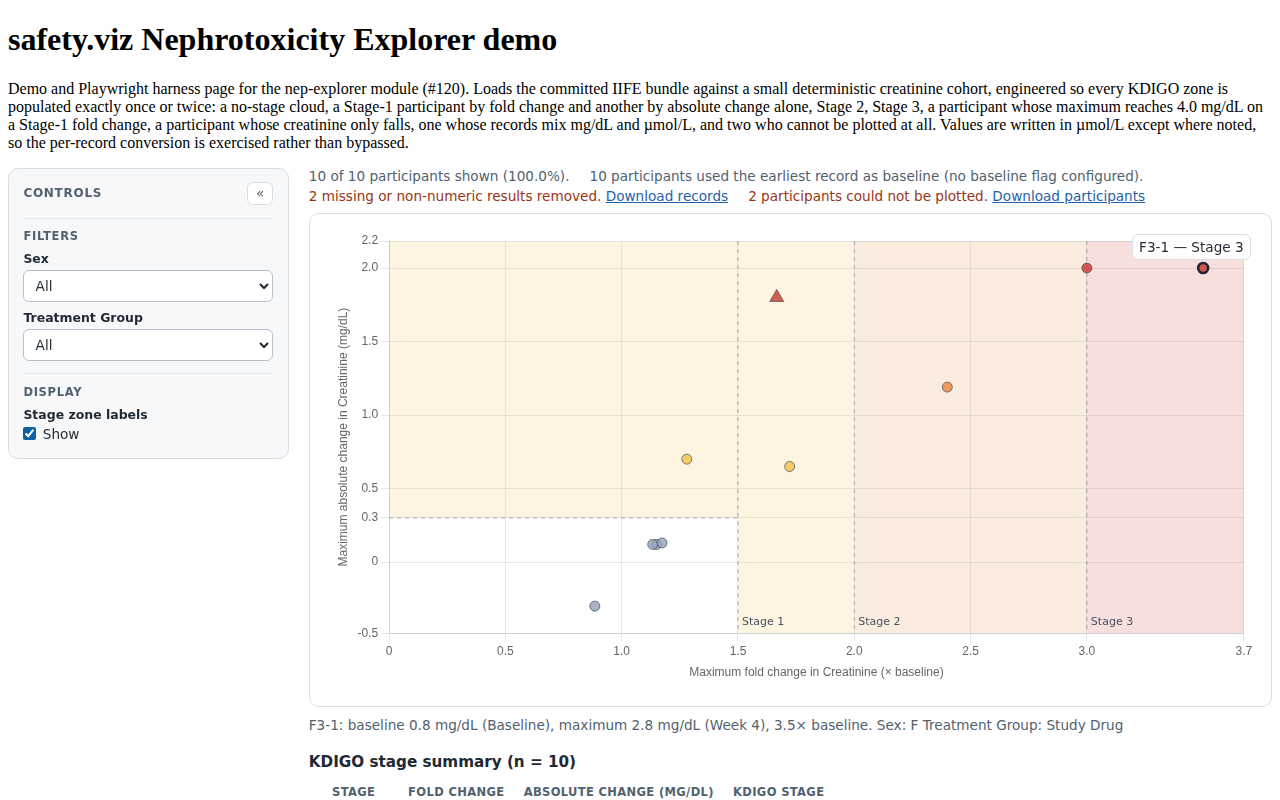
NEP-SCAT-004 NEP-SCAT-004 Clicking a point selects it, styles it distinctly, names the participant and their stage on the chart, and dispatches the shared | NEP-SCAT-004 | #120 |
 |
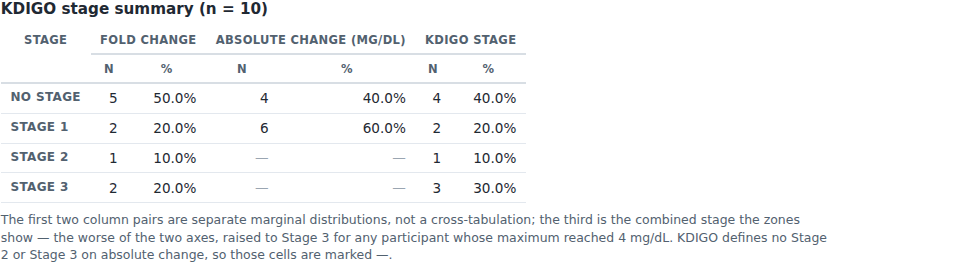
NEP-TBL-001, NEP-TBL-002 NEP-TBL-001 The summary table gives Stage 0–3 down the side and N + % across for the fold-change staging, the absolute-change staging, and the combined stage the zones show. NEP-TBL-002 Every stage row renders even when empty, and the absolute-change column's Stage 2 and Stage 3 cells are marked as not applicable rather than zero, with a note saying KDIGO defines no such stages on absolute change. | NEP-TBL-001, NEP-TBL-002 | #120 |
 |
NEP-DATA-005 NEP-DATA-005 Records and participants that cannot be plotted are counted AND exportable, never silently dropped: a missing or non-numeric result leaves as a row with its reason attached, a participant with no usable result or no post-baseline record leaves as a participant, and each count carries a CSV download built at click time. The module's own derived working is excluded from the export. | NEP-DATA-005 | #120 |
 |
NEP-CFG-006 NEP-CFG-006 Field-list settings (filters, details) accept column names or | NEP-CFG-006 | #120 |
|
NEP-UNIT-003 NEP-UNIT-003 When any record's unit is absent or unrecognized the module refuses to guess: the fold-change axis stays (it is a ratio and unit-free), and the absolute-change staging, the absolute cut-line and the ≥ 4.0 mg/dL rule are all suppressed, with the y-axis labelled in the native unit and a note above the chart saying so. Within that mode a participant whose own records use more than one unit has no computable fold change and is dropped with a reason. | NEP-UNIT-003 | #120 |
 |
Unit evidence (Vitest — tests/unit/nep-explorer/)
15 requirement rows · 92 tests
| Requirement | Source matrix rows | Issue | Tests & evidence |
|---|---|---|---|
NEP-CFG-001..008 (mapping, baseline pair, stage ladder, units, zone labels) NEP-CFG-001 The default settings carry the long-format lab mapping the KDIGO scatter needs: a participant id column giving one point per participant, plus the measure, value, unit, visit and numeric-visit columns. NEP-CFG-002 Baseline identification is an explicit NEP-CFG-003 The stage cut-points are a NEP-CFG-004 The fold ladder is numified and sorted ascending on merge, and a ladder that is not three usable numbers falls back to the KDIGO default rather than half-applying. NEP-CFG-005 The unit contract is a NEP-CFG-006 Field-list settings (filters, details) accept column names or NEP-CFG-007 The stage-zone labels are a NEP-CFG-008 The creatinine measure resolves through | NEP-CFG-001..008 | #120 |
|
NEP-UNIT-001 (µ/μ/u folding, case and whitespace) NEP-UNIT-001 Unit strings are normalized before matching — trimmed, lower-cased, with all three micro spellings ( | NEP-UNIT-001 | #120 |
|
NEP-STAGE-001..004 (fold ladder, 0.3 mg/dL trigger, ≥ 4 rule, combined) NEP-STAGE-001 The fold-change ladder stages a participant at 1.5× (Stage 1), 2× (Stage 2) and 3× (Stage 3), read WORST-MATCH-FIRST so no cut-point can be shadowed by a lower one. NEP-STAGE-002 The absolute-change axis carries exactly one cut-point (0.3 mg/dL) and produces Stage 1 only; there is no Stage 2 or Stage 3 on absolute change. NEP-STAGE-003 A participant whose maximum creatinine reaches ≥ 4.0 mg/dL is Stage 3 whatever their fold change says. The rule is a property of the participant — the value reached, not a change — so it is carried on the mark and in the tooltip rather than as a region of the plane, and is counted as Stage 3 in the summary table. NEP-STAGE-004 The combined stage the zones show is the WORSE of the two axes, raised to Stage 3 by the absolute-value rule; a suppressed absolute-change stage cannot lower the fold stage. | NEP-STAGE-001..004 | #120 |
|
NEP-DATA-001..005 (baseline + fallback count, maxima, negatives, drops) NEP-DATA-001 When a baseline-flag column is configured, the participant's first record whose value equals NEP-DATA-002 With no flag configured — or for a participant whose flag matches no record — the earliest record is the baseline: study day first, then visit number, then input order. The number of participants resolved by that fallback is reported rather than assumed. NEP-DATA-003 Each participant reduces to one point: their baseline, their maximum value over the POST-baseline records (the baseline record itself can never be the maximum), and the fold change and absolute change between them. NEP-DATA-004 A participant whose creatinine only ever fell keeps a negative absolute change and a fold change below 1, and is plotted rather than dropped. NEP-DATA-005 Records and participants that cannot be plotted are counted AND exportable, never silently dropped: a missing or non-numeric result leaves as a row with its reason attached, a participant with no usable result or no post-baseline record leaves as a participant, and each count carries a CSV download built at click time. The module's own derived working is excluded from the export. | NEP-DATA-001..005 | #120 |
|
NEP-UNIT-002, NEP-UNIT-003 (per-record conversion, suppression, mixed units) NEP-UNIT-002 Results convert to the target unit PER RECORD (1 mg/dL = 88.4 µmol/L) before any comparison, so one participant's records may mix known units and still stage correctly. NEP-UNIT-003 When any record's unit is absent or unrecognized the module refuses to guess: the fold-change axis stays (it is a ratio and unit-free), and the absolute-change staging, the absolute cut-line and the ≥ 4.0 mg/dL rule are all suppressed, with the y-axis labelled in the native unit and a note above the chart saying so. Within that mode a participant whose own records use more than one unit has no computable fold change and is dropped with a reason. | NEP-UNIT-002, NEP-UNIT-003 | #120 |
|
NEP-TBL-001..003 (three N/% pairs, empty rows, empty population) NEP-TBL-001 The summary table gives Stage 0–3 down the side and N + % across for the fold-change staging, the absolute-change staging, and the combined stage the zones show. NEP-TBL-002 Every stage row renders even when empty, and the absolute-change column's Stage 2 and Stage 3 cells are marked as not applicable rather than zero, with a note saying KDIGO defines no such stages on absolute change. NEP-TBL-003 An empty population summarizes to zeroes rather than dividing by zero. | NEP-TBL-001..003 | #120 |
|
NEP-SCAT-003 (maximum visit and study day, degrading without a day column) NEP-SCAT-003 The point carries the visit and the study day its maximum came from; the study-day line is omitted rather than rendered blank when the data has no study-day column. | NEP-SCAT-003 | #120 |
|
NEP-ZONE-005 (axis floors, cut-point ticks, number formatting) NEP-ZONE-005 The axes keep every cut-point on screen: the fold axis runs from 0 to past the last fold cut-point, the change axis covers zero and the absolute trigger and extends below zero when the data goes there, both are padded so no point sits on the frame, and the cut-points are labelled as ticks. | NEP-ZONE-005 | #120 |
|
NEP-ZONE-001..003 (L geometry, paint order, ramp and labels) NEP-ZONE-001 The stage zones are painted as filled regions from the staging cut-points: a Stage-3 band above the last fold cut, a Stage-2 band between the second and third, and Stage 1 as the band between the first and second PLUS everything at or above the absolute trigger below the first — the L. The no-stage box is left unpainted. Regions are clipped to the visible domain and omitted when it excludes them. NEP-ZONE-002 Zones are drawn in NEP-ZONE-003 Stage severity is ordinal, so the zones take an ordered status ramp at a background-appropriate opacity, and every zone carries a text label — colour is never the only cue. | NEP-ZONE-001..003 | #120 |
|
NEP-SCAT-001, NEP-SCAT-002, NEP-SCAT-004 (marks, tooltip lines, selection) NEP-SCAT-001 One mark per participant, filled by the combined stage so the cloud reads by severity even with the zones hidden, with a distinct larger marker for a participant tripping the absolute-value rule. NEP-SCAT-002 The point tooltip carries the source's lines: participant, KDIGO stage, fold change with its stage, absolute change with its stage, baseline and maximum creatinine with the visits they came from — signing a negative change with a real minus glyph — plus a line naming the absolute-value rule when it fires. NEP-SCAT-004 Clicking a point selects it, styles it distinctly, names the participant and their stage on the chart, and dispatches the shared | NEP-SCAT-001, 002, 004 | #120 |
|
NEP-DATA-006 (required columns; a creatinine-free dataset is reported) NEP-DATA-006 | NEP-DATA-006 | #120 |
|
NEP-API-001 (module export) NEP-API-001 The public module collection exposes the | NEP-API-001 | #120 |
|
NEP-COHORT-001..012 (the synthetic AKI demo cohort's data shape) NEP-COHORT-001 The synthetic acute-kidney-injury cohort is present in the shared demo extract, labelled synthetic by participant id, site and arm, and carries the file's measure contract with creatinine as its only measure. NEP-COHORT-002 Every cohort participant has a day-0 baseline record and enough distinct post-baseline visits to trace a path. NEP-COHORT-003 Cohort creatinine is written in µmol/L, in the single unit spelling the rest of the file uses for that measure. NEP-COHORT-004 The demo extract carries no baseline-flag column, so the demo runs on the baseline fallback. NEP-COHORT-005 All four fold-change stages are populated, with enough participants per stage that the summary table's percentages mean something. NEP-COHORT-006 The cohort's absolute-change staging carries Stage 1 and no-stage participants only. NEP-COHORT-007 The fold and absolute stagings disagree in BOTH directions: some participants are Stage 1 on absolute change alone, and some on fold change alone. NEP-COHORT-008 Every zone the chart paints is populated on the combined stage. NEP-COHORT-009 The cohort contains participants who reach ≥ 4.0 mg/dL, including participants whose fold change alone would only be Stage 1. NEP-COHORT-010 The cohort contains participants whose creatinine only falls, whose maximum post-baseline value is clearly below their own baseline. NEP-COHORT-011 Both arms are populated and the injury signal skews to the active arm. NEP-COHORT-012 The injection ADDS rows and leaves the pharmaverseadam and chronic-liver-disease populations byte-for-byte untouched; the generator is deterministic and idempotent, and fails the build when a generated participant misses the stage its archetype promises. | NEP-COHORT-001..012 | #120 |
|
NEP-FILT-001..004 (shared filter contract) NEP-FILT-001 A filter spec accepts NEP-FILT-002 NEP-FILT-003 NEP-FILT-004 | NEP-FILT-001, NEP-FILT-002, NEP-FILT-003, NEP-FILT-004 | #166 |
|
NEP-CTRL-001 NEP-CTRL-001 A reset control at the foot of the control panel returns the chart to its opening view: the filters and the stage-zone-label choice return to their configured defaults, the selection clears, and the scatter and the stage summary are rebuilt for the whole cohort. | NEP-CTRL-001 | #136 |
|
The demo cohort (D8, #89 DEMO-6)
0 requirement rows · 0 tests
| Requirement | Source matrix rows | Issue | Tests & evidence |
|---|
Known limits at this revision
0 requirement rows · 0 tests
| Requirement | Source matrix rows | Issue | Tests & evidence |
|---|
Visual evidence
Every screenshot below is a committed baseline: the same PNG is the visual-regression baseline the browser suite asserts against and the evidence artifact shown here. Click any capture for the full-resolution image.
NEP DATA 005 dropped record notes NEP SCAT 004 participant selected NEP STAGE 003 absolute rule mark NEP TBL 001 stage summary table NEP UNIT 003 unknown unit suppression NEP ZONE 001 stage zones scatter NEP ZONE 004 zone labels hidden
Reproducing this report
The evidence set is regenerated from a full test run and committed with the code it qualifies; CI fails when they drift. To verify or rebuild it:
npm ci
npm run evidence:check   # compare a fresh run against the committed evidence
npm run evidence         # regenerate docs/evidence/nep-explorer/evidence.json
Screenshot baselines are canonical to the Linux CI runner; the repository's Update evidence baselines workflow is the authoritative way to refresh them. See CONTRIBUTING.md for the traceability convention.