Participant Profile: test evidence Experimental

Requirement-traced qualification evidence for the safety.viz participant-profile module.

Scope
27 coverage rows26 distinct requirement IDs
Tests executed
387 automated checks28 browser Β· 359 unit
Result
pass all passing6 evidence screenshots
Generated
2026-08-15 09:05 UTC
Environment
linux 6.17.0-1022-azure Β· node v22.23.2 Β· playwright 1.61.1 Β· chromium 149.0.7827.55

Scope & approach

Traceability for the participant-profile module β€” the standardized-lab participant drill-down (demographics header, labs-over-time spaghetti, and per-measure summary table with sparklines and an expandable inset) that the original SafetyGraphics hep-explorer welded into its eDISH renderer, lifted into a standalone, chart-agnostic module β€” built under #98; parent requirement obot.roadmap#45, per the convention in CONTRIBUTING.md.

Requirement IDs use the module's **PPRF-*** area scheme, mapped onto the issue's PPRF-1..9 requirements: PPRF-CORE-* (the two mounts, ingest, and the data contract β€” PPRF-1), PPRF-HDR-* (the participant header β€” PPRF-2), PPRF-SPAG-* (the labs-over-time spaghetti β€” PPRF-3), PPRF-TBL-* (the measure table, sparklines, inset, and optional listing β€” PPRF-4), PPRF-STEP-* (the worst-first cohort stepper β€” PPRF-5), PPRF-EVT-* (the participantsSelected event contract β€” PPRF-6), and PPRF-HEP-* (the hep-explorer adoption that replaced the legacy welded drill-down β€” PPRF-7).

v2 (obot.roadmap#75) adds PPRF-RAIL-* (the right-hand rail that replaces the dock β€” decisions D1/D2), PPRF-EXP-* (expand-to-fill-the-container β€” D3), PPRF-MODE-* (the rail's responsive stacking now that the dock is removed β€” D4), PPRF-AE-* (the adverse-event data contract and cleaning), PPRF-AESUM-* (the AE summary block β€” D6), PPRF-AETL-* (the AE timeline β€” D5), and PPRF-AXIS-* (the shared study-day domain β€” D7). PPRF-CORE-005 is superseded: the docked mount it described no longer exists, and profileRail takes its place. The hep-explorer adoption tests live in this module's spec file deliberately: the evidence pipeline routes browser captures by spec filename, and the adoption is this module's behaviour even though the fixtures drive hep-explorer.

Each table row traces one requirement to the automated test(s) that evidence it: the Requirement column shows the reviewed requirement text and its ID, the source-matrix rows link back to the specification, the issue column links the implementing work, and the result column shows the recorded outcome of every matching test from the committed evidence.json with its captured screenshots. Browser evidence is captured at fixed conditions (1280Γ—800, device scale 1) on the canonical Linux CI environment.

Browser evidence (Playwright β€” tests/e2e/participant-profile.spec.js)

7 requirement rows Β· 6 tests

RequirementSource matrix rowsIssueTests & evidence
PPRF-HEP-001, PPRF-CORE-001

PPRF-HEP-001 hep-explorer enables the dock by default in both views: scatter click keeps the on-chart visit trace and rugs while the module replaces the bespoke drawDetail, which is deleted.

PPRF-CORE-001 The participant profile is a single module in src/participant-profile/ containing no renderer-specific logic; both mounts render the same header, spaghetti and measure-table composition from the same cleaned-row input.

PPRF-HEP-001, PPRF-CORE-001#98
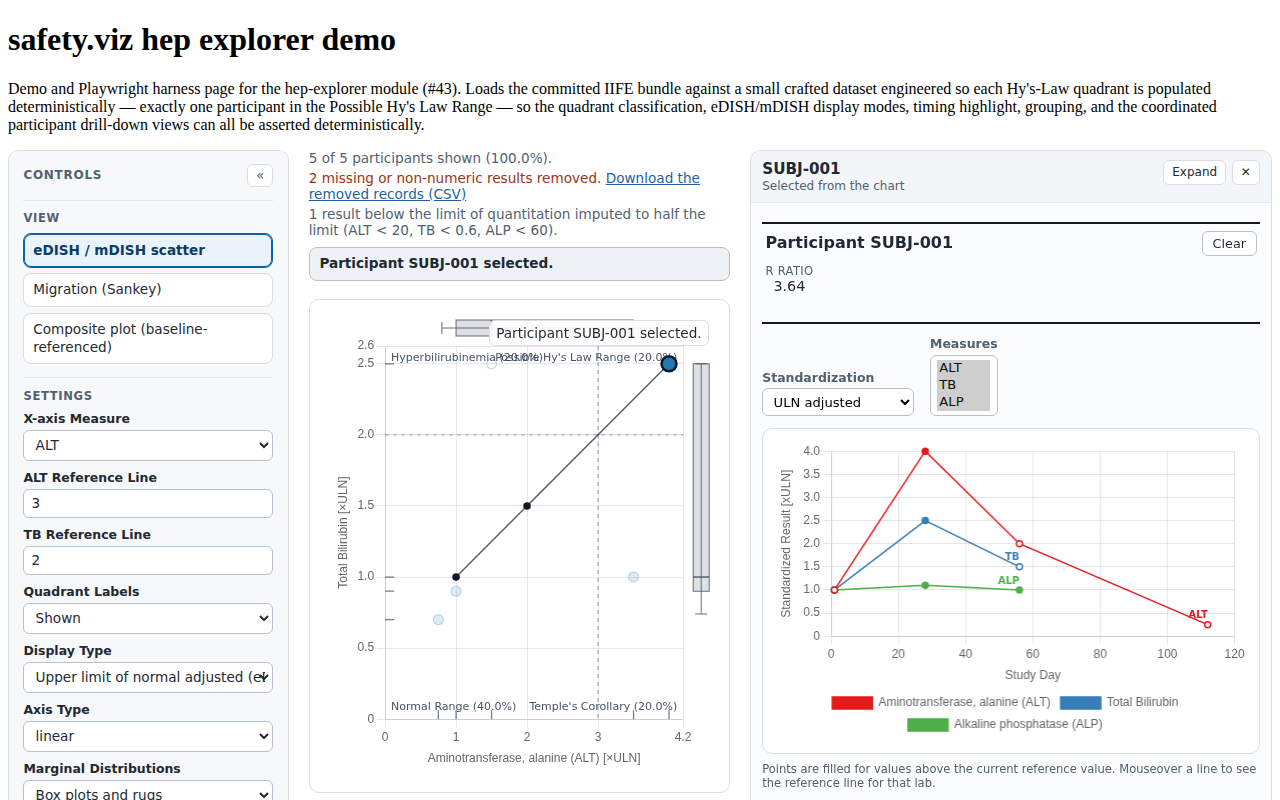
  • pass PPRF-HEP-001/PPRF-CORE-001: scatter click opens the profile in the rail beside the chart β€” header, spaghetti, and measure table replace the legacy detail panel (#98)
Evidence screenshot PPRF-HEP-001-scatter-rail.png
PPRF-HEP-005

PPRF-HEP-005 A background click (empty selection dispatch) clears the selection, empties the dock slot, and the shell's :empty rule hides the block.

PPRF-HEP-005#98
  • pass PPRF-HEP-005: background click clears the selection and hides the rail (#98)
PPRF-HEP-002, PPRF-STEP-001

PPRF-HEP-002 In the composite view, focusing a single participant (click or selector) opens the docked profile and a multi-participant selection shows the stepper.

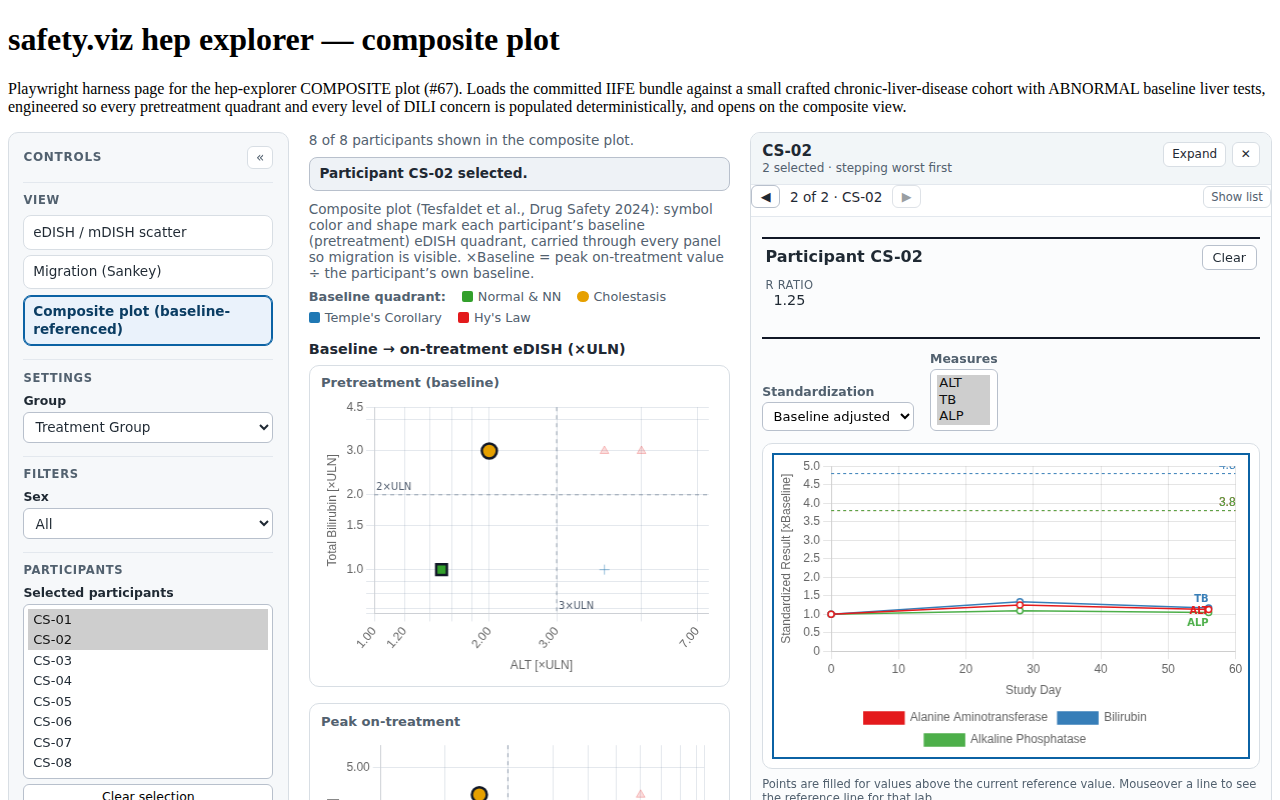
PPRF-STEP-001 When the selection holds more than one participant, the dock collapses to a stepper (β—€ k of N Β· id β–Ά) that renders the full profile for the current participant and keeps the host chart highlight in sync while stepping.

PPRF-HEP-002, PPRF-STEP-001#98
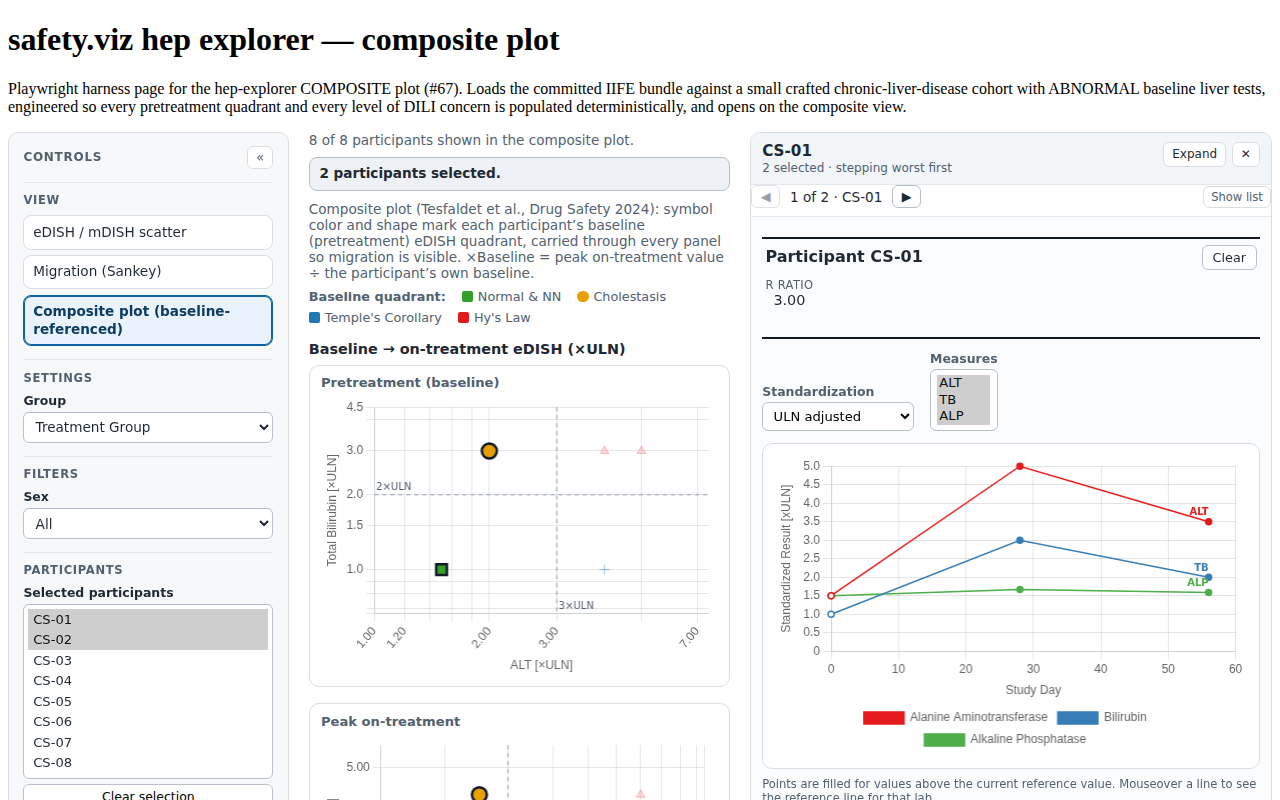
  • pass PPRF-HEP-002/PPRF-STEP-001/PPRF-HDR-002: composite multi-select collapses the rail to a stepper, stepping renders each profile and keeps the chart highlight in sync, Clear hides the rail (#98)
Evidence screenshot PPRF-STEP-001-composite-stepper.png
PPRF-HEP-003

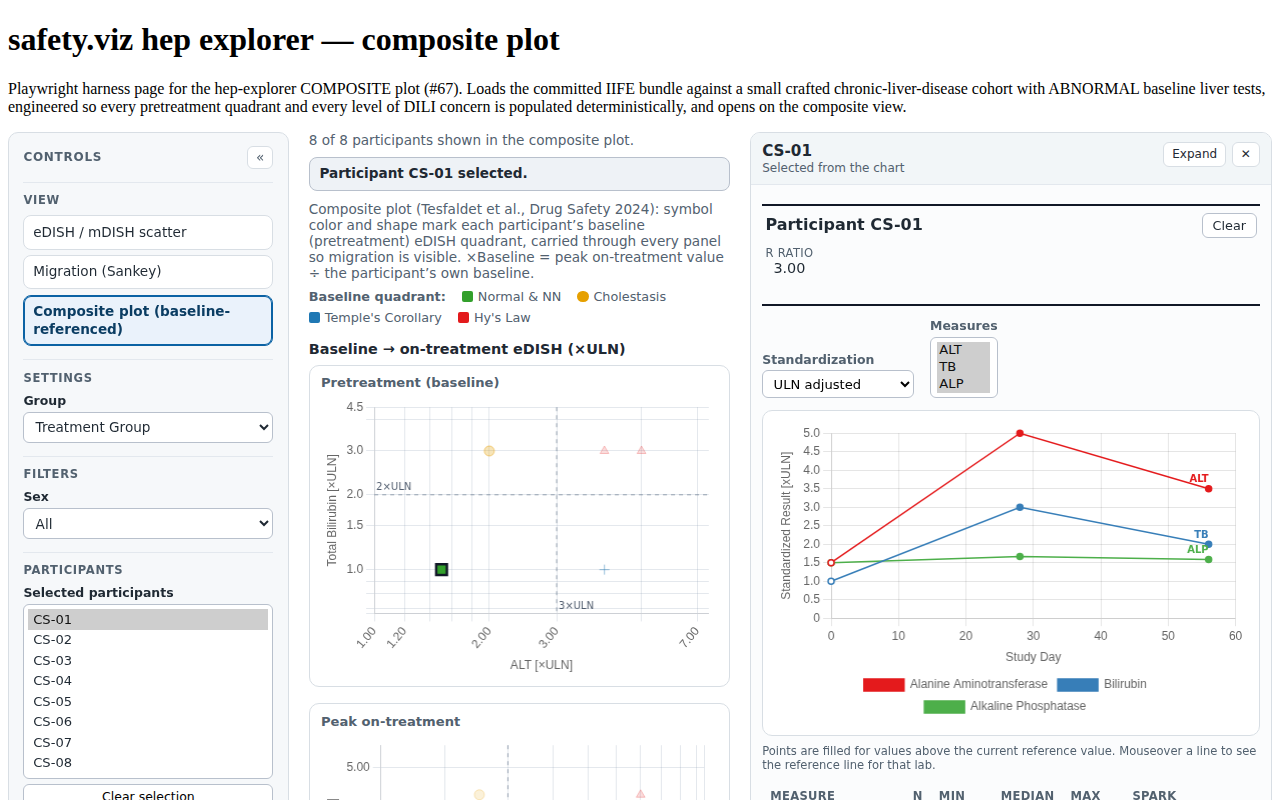
PPRF-HEP-003 In the composite view, focusing a single participant β€” point click or the shared Participants selector β€” opens the full docked profile, not the stepper.

PPRF-HEP-003#98
  • pass PPRF-HEP-003: composite single focus (point click or selector) opens the full profile, not the stepper (#98)
PPRF-HEP-004

PPRF-HEP-004 The migration ribbon hand-off arrives in the composite view with the dock opened on the carried cohort, with no dock-specific edits to the migration, composite or selection code paths.

PPRF-HEP-004#98
  • pass PPRF-HEP-004: the migration ribbon hand-off arrives in the composite view with the rail opened on the carried cohort (#98)
Evidence screenshot PPRF-HEP-004-migration-handoff-dock.png
PPRF-EVT-001, PPRF-CORE-002

PPRF-EVT-001 Docked, the module derives its content from the host chart's selection state including clear; standalone, it listens for participantsSelected (payload {detail:{data: ids}}) on a configurable target; in neither mount does it dispatch selection events itself.

PPRF-CORE-002 SafetyViz.participantProfile(el, data, config) renders the profile standalone, ingesting the standard long-lab data contract.

PPRF-EVT-001, PPRF-CORE-002#98
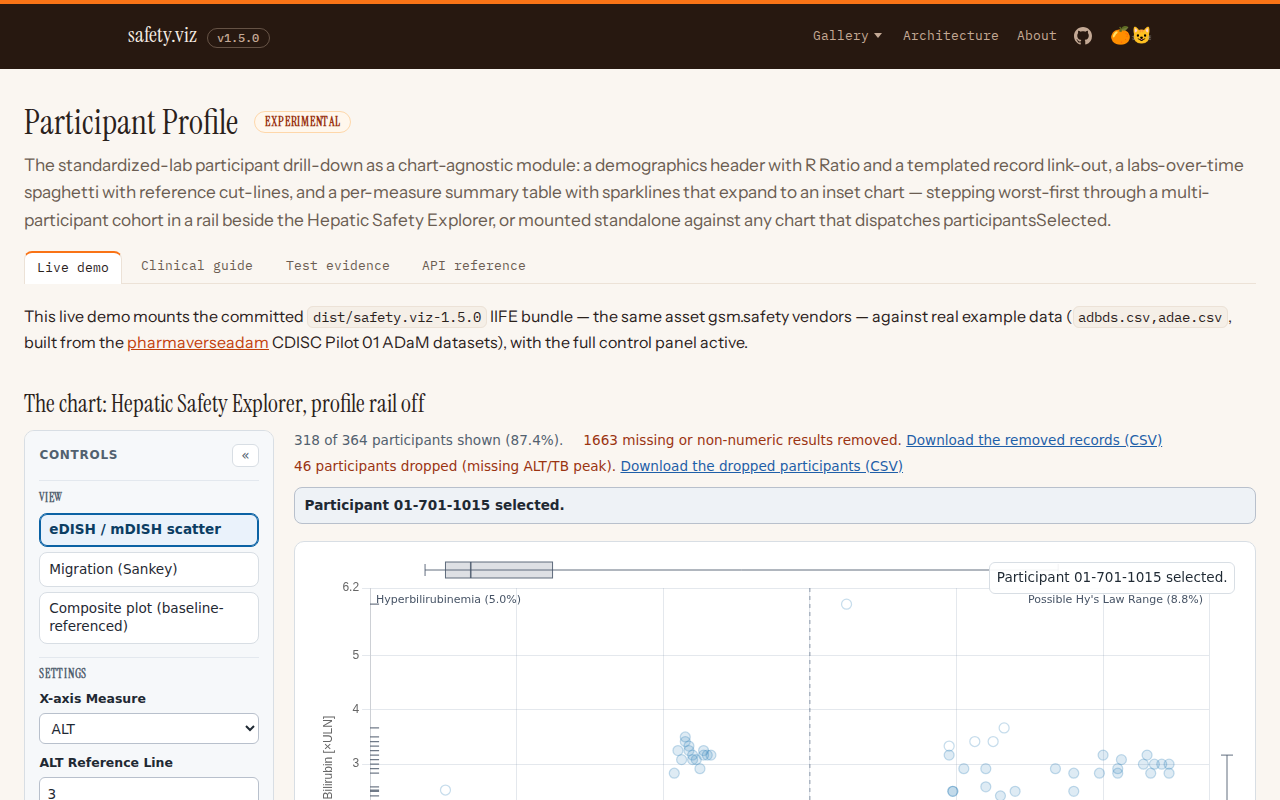
  • pass PPRF-EVT-001/PPRF-CORE-002: the standalone demo wires the profile to a chart via participantsSelected β€” chart click renders the neighbouring profile, background click clears it (#98)
Evidence screenshot PPRF-EVT-001-linked-charts-demo.png
PPRF-RAIL-001

PPRF-RAIL-001 renderShell exposes a railWrap slot as an aside.sv-rail sibling of the main column, placed after it so the profile sits opposite the control sidebar; no dock slot remains inside the main column.

PPRF-RAIL-001#75
  • no record the rail is a sibling of the main column, opposite the control sidebar; no dock slot remains inside the main column

Unit evidence (Vitest β€” tests/unit/participant-profile/)

20 requirement rows Β· 133 tests

RequirementSource matrix rowsIssueTests & evidence
PPRF-CORE-001 (module export: factory + rail)

PPRF-CORE-001 The participant profile is a single module in src/participant-profile/ containing no renderer-specific logic; both mounts render the same header, spaghetti and measure-table composition from the same cleaned-row input.

PPRF-CORE-001#98

export.test.js

  • pass participant-profile module export (PPRF-CORE-001) (#98) PPRF-1: the public collection exposes the participantProfile factory
PPRF-CORE-002 (standalone long-lab contract guard)

PPRF-CORE-002 SafetyViz.participantProfile(el, data, config) renders the profile standalone, ingesting the standard long-lab data contract.

PPRF-CORE-002#98

checkInputs.test.js

  • pass checkInputs β€” standalone long-lab contract (PPRF-1, PPRF-CORE-002) accepts data carrying every required mapped column
  • pass checkInputs β€” standalone long-lab contract (PPRF-1, PPRF-CORE-002) names every missing required variable in one error
  • pass checkInputs β€” standalone long-lab contract (PPRF-1, PPRF-CORE-002) treats empty data as missing every required variable
PPRF-CORE-003 (defaults + settings normalization)

PPRF-CORE-003 When docked, the profile renders into an sv-profile shell slot below the host chart card and is fed the host chart's cleaned rows, performing no second data ingest.

PPRF-CORE-003#98

configure.test.js

  • pass participant-profile DEFAULT_SETTINGS (PPRF-1/2/3/4, PPRF-CORE-003) carries the house long-lab column defaults
  • pass participant-profile DEFAULT_SETTINGS (PPRF-1/2/3/4, PPRF-CORE-003) defaults measureBounds to the 1st/99th percentiles (PPRF-4)
  • pass participant-profile DEFAULT_SETTINGS (PPRF-1/2/3/4, PPRF-CORE-003) defaults the display to relative_uln with the two toggle options (PPRF-3)
  • pass participant-profile DEFAULT_SETTINGS (PPRF-1/2/3/4, PPRF-CORE-003) defaults the header/link/event settings off (PPRF-2/5/6)
  • pass participant-profile syncSettings (PPRF-1, PPRF-CORE-003) coerces measureBounds back to a two-quantile array
  • pass participant-profile syncSettings (PPRF-1, PPRF-CORE-003) deep-merges a partial cuts override, back-filling the untouched measures
  • pass participant-profile syncSettings (PPRF-1, PPRF-CORE-003) deep-merges a partial measure_values override, keeping the other keys
  • pass participant-profile syncSettings (PPRF-1, PPRF-CORE-003) normalizes details to {value_col, label} specs from strings and objects (PPRF-2)
  • pass participant-profile syncSettings (PPRF-1, PPRF-CORE-003) normalizes filters and groups to empty arrays so hep-core reducers can run
PPRF-CORE-004 (standalone chrome: shell mount, hidden chart card)

PPRF-CORE-004 The standalone mount renders the house shell chrome β€” sidebar controls with the chart card hidden, the profile block owning the main column β€” and shows an idle note naming the listen target until a selection arrives.

PPRF-CORE-004#98

events.test.js

  • pass standalone chrome (PPRF-1, PPRF-CORE-004) mounts the shell with the chart card hidden and an idle note
PPRF-CORE-005 (railed mount: pre-cleaned rows, imperative feed)

PPRF-CORE-005 profileDock(container, settings) mounts the dock imperatively: it consumes the host's pre-cleaned rows verbatim β€” no checkInputs, no cleanData β€” installs no event listener, and is driven via show/clear/resize/destroy.

PPRF-CORE-005#98

rail.test.js

  • pass profileRail (PPRF-1, PPRF-CORE-005, PPRF-RAIL-001) clear empties the profile block and returns the rail to its idle head
  • pass profileRail (PPRF-1, PPRF-CORE-005, PPRF-RAIL-001) installs no event listener β€” participantsSelected on document is ignored
  • pass profileRail (PPRF-1, PPRF-CORE-005, PPRF-RAIL-001) pins the worst-first stepper in the rail head, not in the scrolling block (D8)
  • pass profileRail (PPRF-1, PPRF-CORE-005, PPRF-RAIL-001) railed Clear invokes on_clear and leaves clearing to the host (PPRF-6)
  • pass profileRail (PPRF-1, PPRF-CORE-005, PPRF-RAIL-001) resize reaches the live charts; destroy tears them down and empties the container
  • pass profileRail (PPRF-1, PPRF-CORE-005, PPRF-RAIL-001) show renders the profile from pre-cleaned rows without re-ingesting
  • pass profileRail (PPRF-1, PPRF-CORE-005, PPRF-RAIL-001) stepping re-renders the profile and calls on_step with the id
PPRF-HDR-001 (demographics, R Ratio, P_ALT pass-through, Clear)

PPRF-HDR-001 The profile header shows the participant id, the demographic fields configured in config.details, the computed R Ratio, and P_ALT where computable.

PPRF-HDR-001#98

header.test.js, structureData.test.js

  • pass buildProfileModel β€” participant header fields (PPRF-2, PPRF-HDR-001) computes P_ALT only when the caller opts in, as the {text_value, note} the header explains (#49)
  • pass buildProfileModel β€” participant header fields (PPRF-2, PPRF-HDR-001) computes the R Ratio (peak ALT xULN / peak ALP xULN) on the ULN scale
  • pass buildProfileModel β€” participant header fields (PPRF-2, PPRF-HDR-001) leaves the R Ratio NaN when ALP is missing
  • pass buildProfileModel β€” participant header fields (PPRF-2, PPRF-HDR-001) passes P_ALT through from p_alt_col where a value exists, and computes none by default
  • pass buildProfileModel β€” participant header fields (PPRF-2, PPRF-HDR-001) prefers the caller’s own supplied P_ALT over the computed estimate (#49)
  • pass buildProfileModel β€” participant header fields (PPRF-2, PPRF-HDR-001) resolves details from the settings specs against the participant rows
  • pass renderHeader (PPRF-2, PPRF-HDR-001) invokes the Clear handler from a real button, dispatching no selection event (PPRF-6, PPRF-HDR-002)
  • pass renderHeader (PPRF-2, PPRF-HDR-001) renders P_ALT only when the pass-through yields a value
  • pass renderHeader (PPRF-2, PPRF-HDR-001) renders the participant id and a label/value entry per detail
  • pass renderHeader (PPRF-2, PPRF-HDR-001) shows the computed R Ratio to two decimals, blank when not computable
  • pass renderHeader (PPRF-2, PPRF-HDR-001) supports the original's {text_value, note} P_ALT shape with click-to-footnote
  • pass renderHeader (PPRF-2, PPRF-HDR-001) templates the link-out href by {id}, and omits the link without a URL (PPRF-HDR-003, closes #53)
PPRF-HDR-002 ({id}-templated link-out, closes #53)

PPRF-HDR-002 The header provides a Clear affordance that empties the profile and, when docked, clears the host chart's selection highlight.

PPRF-HDR-002#98

configure.test.js

  • pass renderHeader (PPRF-2, PPRF-HDR-001) invokes the Clear handler from a real button, dispatching no selection event (PPRF-6, PPRF-HDR-002)
PPRF-SPAG-001 (series building, cut lines, spaghetti render)

PPRF-SPAG-001 The labs-over-time spaghetti draws one day-indexed line per key measure, toggling between Γ—ULN and Γ—baseline display, with non-key measures available behind a toggle.

PPRF-SPAG-001#98

spaghetti.test.js, structureData.test.js

  • pass buildProfileModel β€” spaghetti series (PPRF-3, PPRF-SPAG-001) builds one series per key measure present, day-ordered, in display units
  • pass buildProfileModel β€” spaghetti series (PPRF-3, PPRF-SPAG-001) carries raw value and visit context on every point for the tooltips (parity addPointTitles)
  • pass buildProfileModel β€” spaghetti series (PPRF-3, PPRF-SPAG-001) defaults the spaghetti axis type to linear and follows an axis_type override
  • pass buildProfileModel β€” spaghetti series (PPRF-3, PPRF-SPAG-001) includes non-key measures as extra (isKey false) series
  • pass buildProfileModel β€” spaghetti series (PPRF-3, PPRF-SPAG-001) labels the y axis for the active display mode
  • pass buildProfileModel β€” spaghetti series (PPRF-3, PPRF-SPAG-001) resolves per-measure cuts, falling back to the defaults entry (PPRF-3)
  • pass buildProfileModel β€” spaghetti series (PPRF-3, PPRF-SPAG-001) switches the series field with the display state (xBaseline)
  • pass cutLinePlugin (PPRF-3, PPRF-SPAG-001) draws nothing when no dataset is active
  • pass cutLinePlugin (PPRF-3, PPRF-SPAG-001) draws the hovered dataset dashed cut line with a right-aligned 0.1f label
  • pass renderSpaghetti (PPRF-3, PPRF-SPAG-001) mounts a line chart of the visible series with the display y-label
  • pass renderSpaghetti (PPRF-3, PPRF-SPAG-001) re-renders extras when the state shows them
  • pass renderSpaghetti (PPRF-3, PPRF-SPAG-001) shows the original's filled-points footnote copy
  • pass spaghettiDatasets (PPRF-3, PPRF-SPAG-001) builds one line dataset per series with day x-values
  • pass spaghettiDatasets (PPRF-3, PPRF-SPAG-001) carries the cut on the dataset for the cut-line plugin
  • pass spaghettiDatasets (PPRF-3, PPRF-SPAG-001) fills points at or above the cut and hollows points below it
  • pass tooltip visit context and raw/adjusted pairing (PPRF-3, PPRF-SPAG-001) carries the point models on the dataset and formats title/label from them
  • pass tooltip visit context and raw/adjusted pairing (PPRF-3, PPRF-SPAG-001) falls back to the adjusted value alone when the point carries no raw/visit fields
  • pass visibleSeries β€” extras and lab subsetting (PPRF-3, PPRF-SPAG-001) filters datasets through the lab subsetter
  • pass visibleSeries β€” extras and lab subsetting (PPRF-3, PPRF-SPAG-001) includes non-key measures behind the extras toggle
  • pass visibleSeries β€” extras and lab subsetting (PPRF-3, PPRF-SPAG-001) keeps the extras toggle live under a lab subset: hidden extras never draw
  • pass visibleSeries β€” extras and lab subsetting (PPRF-3, PPRF-SPAG-001) shows key measures only by default
PPRF-SPAG-002 (Γ—ULN/Γ—Baseline and lab-subset controls)

PPRF-SPAG-002 Each spaghetti measure applies its per-measure reference cut: the cut line appears on hover/focus and points at or above the cut render filled while points below render unfilled.

PPRF-SPAG-002#98

controls.test.js

  • pass cut lines on keyboard focus (PPRF-3/8, PPRF-SPAG-002, PPRF-ACC-001) draws EVERY visible cut line while the canvas holds focus, hover aside
  • pass cut lines on keyboard focus (PPRF-3/8, PPRF-SPAG-002, PPRF-ACC-001) the rendered canvas is focusable with a text alternative (PPRF-8)
  • pass displayControl (PPRF-3, PPRF-SPAG-002) offers the display_options and reports the chosen value
  • pass labControl (PPRF-3, PPRF-SPAG-002) reflects a subset and reports selection changes
  • pass labControl (PPRF-3, PPRF-SPAG-002) selects every lab when the state carries no subset
  • pass spaghetti y-domain includes the reference cuts (PPRF-3, PPRF-SPAG-002) follows a log axis type without pinning the minimum to 0 (PPRF-7 drawDetail parity)
  • pass spaghetti y-domain includes the reference cuts (PPRF-3, PPRF-SPAG-002) pins the linear axis to 0 and suggests the visible series' max cut (parity onDraw [0, max(values, cuts)])
Evidence screenshot PPRF-ACC-001-keyboard-stepper.png
PPRF-SPAG-003 (measure color palette)

PPRF-SPAG-003 Each measure receives a stable categorical palette color shared by its spaghetti line, sparkline and inset, cycling when a profile carries more measures than colors.

PPRF-SPAG-003#98

configure.test.js

  • pass measure color palette (PPRF-3, PPRF-SPAG-003) assigns stable palette colors in key order, cycling when exhausted
PPRF-SPAG-004 (full names in the legend, short keys on the lines)

PPRF-SPAG-004 The spaghetti legend names each measure in FULL β€” Total Bilirubin, not TB β€” and each line carries its short key written at the line's own last point in the line's colour, deconflicted vertically when two lines end at the same height. The point tooltip stays on the short key, and the canvas text alternative names the measures in full.

PPRF-SPAG-004#54

spaghetti.test.js

  • pass end-of-line measure annotations (PPRF-SPAG-004, #54) draws each line's short key at that line's last point
  • pass end-of-line measure annotations (PPRF-SPAG-004, #54) leaves annotations that already clear each other where their lines end
  • pass end-of-line measure annotations (PPRF-SPAG-004, #54) pushes colliding annotations apart so two lines ending together stay readable
  • pass end-of-line measure annotations (PPRF-SPAG-004, #54) skips a dataset with no drawn points rather than annotating nothing
  • pass full names in the legend, short keys on the lines (PPRF-SPAG-004, #54) falls back to the short key when a series carries no full label
  • pass full names in the legend, short keys on the lines (PPRF-SPAG-004, #54) keeps the tooltip on the short key so the full name cannot crowd the readout
  • pass full names in the legend, short keys on the lines (PPRF-SPAG-004, #54) labels each dataset with the full measure name and keeps the short key beside it
  • pass full names in the legend, short keys on the lines (PPRF-SPAG-004, #54) names the measures in full in the canvas text alternative
PPRF-TBL-001 (per-measure summary model + table render)

PPRF-TBL-001 The measure table lists every measure β€” key measures first, extras behind a "show N additional" toggle β€” with N, min, median, max and an inline sparkline per row.

PPRF-TBL-001#98

measureTable.test.js, structureData.test.js

  • pass buildProfileModel β€” measure table model (PPRF-4, PPRF-TBL-001) assigns each measure a color from the module palette
  • pass buildProfileModel β€” measure table model (PPRF-4, PPRF-TBL-001) carries lln/uln and flags outliers on each spark point
  • pass buildProfileModel β€” measure table model (PPRF-4, PPRF-TBL-001) computes the population extent over ALL participants at measureBounds
  • pass buildProfileModel β€” measure table model (PPRF-4, PPRF-TBL-001) narrower measureBounds move the extent inside the population range
  • pass buildProfileModel β€” measure table model (PPRF-4, PPRF-TBL-001) orders rows key-first in measure_values order, extras after
  • pass buildProfileModel β€” measure table model (PPRF-4, PPRF-TBL-001) reads the full TEST string as the label for key measures
  • pass buildProfileModel β€” measure table model (PPRF-4, PPRF-TBL-001) summarizes N/min/median/max from the raw values
  • pass footnote helpers (PPRF-4, PPRF-TBL-001) labels quantiles as ordinal percentiles
  • pass footnote helpers (PPRF-4, PPRF-TBL-001) reflects configured measureBounds in the footnote copy
  • pass formatSummary (PPRF-4, PPRF-TBL-001) formats to two decimals (parity 0.2f), blank when not finite
  • pass renderMeasureTable (PPRF-4, PPRF-TBL-001) collapses an open extra-row inset when extras are hidden again
  • pass renderMeasureTable (PPRF-4, PPRF-TBL-001) hides extra measures by default behind the parity toggle copy
  • pass renderMeasureTable (PPRF-4, PPRF-TBL-001) puts a keyboard-operable toggle and a sparkline in every spark cell
  • pass renderMeasureTable (PPRF-4, PPRF-TBL-001) renders one row per measure in model (key-first) order with summary columns
  • pass renderMeasureTable (PPRF-4, PPRF-TBL-001) renders the original's percentile footnote below the table (parity addFootnote)
  • pass renderMeasureTable (PPRF-4, PPRF-TBL-001) reveals and re-hides extra rows through the toggle, reporting the change
  • pass renderMeasureTable (PPRF-4, PPRF-TBL-001) shows extras from the start when the state says so, and omits the toggle without extras
PPRF-TBL-002 (sparklines with normal-range and population bands)

PPRF-TBL-002 Activating a row's sparkline expands an inset line chart showing the LLN–ULN normal-range band, population-extent guides defaulting to the 1st/99th percentiles, and marked outliers.

PPRF-TBL-002#98

sparkline.test.js

  • pass sparkDomain (PPRF-4, PPRF-TBL-002) pads the union of participant values and the population extent Γ—0.99/Γ—1.01
  • pass sparkDomain (PPRF-4, PPRF-TBL-002) unions participant outliers beyond the population extent
  • pass sparklineSVG (PPRF-4, PPRF-TBL-002) builds a 100Γ—25 svg with band, guides, line, and outliers β€” no listeners
  • pass sparklineSVG (PPRF-4, PPRF-TBL-002) centers a single-day series instead of dividing by zero
  • pass sparklineSVG (PPRF-4, PPRF-TBL-002) draws dashed full-width guide lines at the population-extent values
  • pass sparklineSVG (PPRF-4, PPRF-TBL-002) draws the LLN–ULN normal-range band polygon (ULN forward, LLN reversed)
  • pass sparklineSVG (PPRF-4, PPRF-TBL-002) draws the value path in the measure color over the day-ordered points
  • pass sparklineSVG (PPRF-4, PPRF-TBL-002) marks outliers with filled r=2 circles in the measure color
PPRF-TBL-003 (sparkline β†’ inset expansion lifecycle)

PPRF-TBL-003 The inset line chart computes a padded y-domain unioning the participant's values, the population extent and the finite normal-range limits, and paints the LLN–ULN band and dashed population-extent guides in chart space with outlier points filled.

PPRF-TBL-003#98

inset.test.js

  • pass bandGuidePlugin (PPRF-4, PPRF-TBL-003) draws dashed guides across the chart area at the population extent
  • pass bandGuidePlugin (PPRF-4, PPRF-TBL-003) draws no band when no normal-range limit is finite
  • pass bandGuidePlugin (PPRF-4, PPRF-TBL-003) draws the LLN–ULN band in chart space (beforeDatasetsDraw)
  • pass insetYDomain (PPRF-4, PPRF-TBL-003) pads the union of values, population extent, and normal-range limits
  • pass insetYDomain (PPRF-4, PPRF-TBL-003) survives missing normal-range limits
  • pass measure-table inset lifecycle (PPRF-4, PPRF-TBL-003) collapsing destroys the chart and removes the row
  • pass measure-table inset lifecycle (PPRF-4, PPRF-TBL-003) destroy() tears every open inset down (re-render leaks none)
  • pass measure-table inset lifecycle (PPRF-4, PPRF-TBL-003) expanding a spark inserts a full-width row under it hosting the inset
  • pass measure-table inset lifecycle (PPRF-4, PPRF-TBL-003) supports a second expand while one is open
  • pass renderInset (PPRF-4, PPRF-TBL-003) fills outlier points and hollows the rest
  • pass renderInset (PPRF-4, PPRF-TBL-003) installs the band/guide plugin
  • pass renderInset (PPRF-4, PPRF-TBL-003) mounts a line chart of absolute values by study day
PPRF-TBL-004 (non-key-measure "show N additional" toggle)

PPRF-TBL-004 The extras toggle uses the original's "Show N additional measure(s):" copy, reveals and re-hides the non-key measure rows, and collapses any open extra-row inset when extras are hidden.

PPRF-TBL-004#98

controls.test.js

  • pass extrasControl (PPRF-3/4, PPRF-TBL-004) reports toggle changes and reflects the current state
  • pass extrasControl (PPRF-3/4, PPRF-TBL-004) uses the original's copy, singular and plural
PPRF-TBL-005 (optional shared record listing)

PPRF-TBL-005 The optional participant record listing (listing: true) renders the participant's rows through the shared listing renderer with columns derived from the lab mapping by default, a listing_cols override, and paging.

PPRF-TBL-005#98

measureTable.test.js

  • pass listing settings (configure, PPRF-TBL-005) defaults the listing off with derived columns and page size 10
  • pass listing settings (configure, PPRF-TBL-005) normalizes listing_cols to field specs
  • pass record listing (PPRF-4, PPRF-TBL-005, optional) derives default listing columns from the lab mapping, skipping absent columns
  • pass record listing (PPRF-4, PPRF-TBL-005, optional) honors a listing_cols override
  • pass record listing (PPRF-4, PPRF-TBL-005, optional) renders the participant records through the shared listing renderer
PPRF-STEP-001 (stepper render, wrap/clamp, keyboard operation)

PPRF-STEP-001 When the selection holds more than one participant, the dock collapses to a stepper (β—€ k of N Β· id β–Ά) that renders the full profile for the current participant and keeps the host chart highlight in sync while stepping.

PPRF-STEP-001#98

stepper.test.js

  • pass renderStepper (PPRF-5, PPRF-STEP-001) clamps at the ends: buttons disabled, no onStep past the cohort
  • pass renderStepper (PPRF-5, PPRF-STEP-001) renders real labelled buttons in a labelled group
  • pass renderStepper (PPRF-5, PPRF-STEP-001) shows the k-of-N count with the current id, aria-live polite
  • pass renderStepper (PPRF-5, PPRF-STEP-001) steps forward and back through onStep with the target index
  • pass renderStepper (PPRF-5, PPRF-STEP-001) supports ArrowLeft / ArrowRight on the focusable strip (PPRF-8)
Evidence screenshot PPRF-STEP-001-composite-stepper.png
PPRF-STEP-002 (worst-quadrant-first ordering, peak-severity fallback)

PPRF-STEP-002 The stepper orders participants worst quadrant first, falling back to peak severity where quadrant classification does not apply.

PPRF-STEP-002#98

rank.test.js

  • pass rankParticipants β€” worst-first cohort ordering (PPRF-5, PPRF-STEP-002) breaks a quadrant tie by peak ALT xULN, descending
  • pass rankParticipants β€” worst-first cohort ordering (PPRF-5, PPRF-STEP-002) breaks remaining ties by id ascending, deterministically
  • pass rankParticipants β€” worst-first cohort ordering (PPRF-5, PPRF-STEP-002) falls back to peak severity for ids the reduction excludes, after ranked ids
  • pass rankParticipants β€” worst-first cohort ordering (PPRF-5, PPRF-STEP-002) orders by on-treatment quadrant severity: Hy's Law > Temple's Corollary > Normal
  • pass rankParticipants β€” worst-first cohort ordering (PPRF-5, PPRF-STEP-002) returns ids untouched by rank when the list has one entry
PPRF-EVT-001 (participantsSelected listener on the configured target)

PPRF-EVT-001 Docked, the module derives its content from the host chart's selection state including clear; standalone, it listens for participantsSelected (payload {detail:{data: ids}}) on a configurable target; in neither mount does it dispatch selection events itself.

PPRF-EVT-001#98

events.test.js

  • pass participantsSelected listener (PPRF-6, PPRF-EVT-001) clears to idle on an empty selection payload
  • pass participantsSelected listener (PPRF-6, PPRF-EVT-001) destroy removes the listener
  • pass participantsSelected listener (PPRF-6, PPRF-EVT-001) listens on a custom listen_to element instead of document
  • pass participantsSelected listener (PPRF-6, PPRF-EVT-001) listens on document by default and renders the selection
  • pass participantsSelected listener (PPRF-6, PPRF-EVT-001) resolves a listen_to selector string
Evidence screenshot PPRF-EVT-001-linked-charts-demo.png
PPRF-EVT-002 (programmatic selection + on_clear/on_step callbacks)

PPRF-EVT-002 setSelected() takes the same path as the participantsSelected listener, and outbound coordination is callbacks only: stepper navigation reports through on_step and Clear through on_clear β€” the module dispatches no selection events.

PPRF-EVT-002#98

events.test.js

  • pass programmatic selection and callbacks (PPRF-5/6, PPRF-EVT-002) never dispatches participantsSelected (or any selection event)
  • pass programmatic selection and callbacks (PPRF-5/6, PPRF-EVT-002) setSelected takes the same path as the event listener
  • pass programmatic selection and callbacks (PPRF-5/6, PPRF-EVT-002) standalone Clear clears the block locally and invokes on_clear
  • pass programmatic selection and callbacks (PPRF-5/6, PPRF-EVT-002) stepping renders the next participant and calls on_step (PPRF-5)

Visual evidence

Every screenshot below is a committed baseline: the same PNG is the visual-regression baseline the browser suite asserts against and the evidence artifact shown here. Click any capture for the full-resolution image.

Source-matrix routing status

The source matrix lives in this repo at requirements/participant-profile.md and its extract is committed as docs/requirements/participant-profile.json, so the evidence page renders the reviewed requirement text under each ID. The matrix rows use the same PPRF-<AREA>-<NUM> IDs as the tables above.

v2 unit evidence (Vitest β€” obot.roadmap#75)

Requirement IDSource matrix rowsIssueTest file
PPRF-RAIL-001 (shell rail slot, opposite the control sidebar)PPRF-RAIL-001#75renderShell.test.js
PPRF-RAIL-002 (rail head: participant, cohort count, Close)PPRF-RAIL-002#75rail.test.js
PPRF-EXP-001 (Expand fills the host container; Escape collapses)PPRF-EXP-001#75rail.test.js
PPRF-STEP-003 (stepper pinned in the head; expandable ranked list)PPRF-STEP-003#75rail.test.js
PPRF-AE-001 (AE contract: ae-timelines / ae-explorer setting names)PPRF-AE-001#75ae.test.js
PPRF-AE-002 (AE cleaning: ids, open ends, unplaceable, severity)PPRF-AE-002#75ae.test.js
PPRF-AE-003 (per-participant ordering, worst-first)PPRF-AE-003#75ae.test.js
PPRF-AE-004 (the AE block sits directly under the labs chart)PPRF-AE-004#75rail.test.js
PPRF-AE-005 (an AE-only profile: no labs, no empty spaghetti or table)PPRF-AE-005#75ae-adoption.test.js
PPRF-AESUM-001 (four figures, severity mix, body-system rollup)PPRF-AESUM-001#75ae.test.js, aeTracks.test.js
PPRF-AESUM-002 (severity named in the legend, never hue alone)PPRF-AESUM-002#75aeTracks.test.js
PPRF-AETL-001 (rows, bars, open ends, row cap, text alternatives)PPRF-AETL-001#75ae.test.js, aeTracks.test.js
PPRF-AETL-002 (the day ruler)PPRF-AETL-002#75ae.test.js, aeTracks.test.js
PPRF-AXIS-001 (union of the lab and AE domains)PPRF-AXIS-001#75ae.test.js
PPRF-AXIS-002 (pinned plot gutters so the two x-axes align)PPRF-AXIS-002#75aeTracks.test.js

Reproducing this report

The evidence set is regenerated from a full test run and committed with the code it qualifies; CI fails when they drift. To verify or rebuild it:

npm ci
npm run evidence:check   # compare a fresh run against the committed evidence
npm run evidence         # regenerate docs/evidence/participant-profile/evidence.json

Screenshot baselines are canonical to the Linux CI runner; the repository's Update evidence baselines workflow is the authoritative way to refresh them. See CONTRIBUTING.md for the traceability convention.